
Engineering · Raspberry Pi · Project 26 of 47 · Camera and vision · Intermediate
Motion detector with the camera
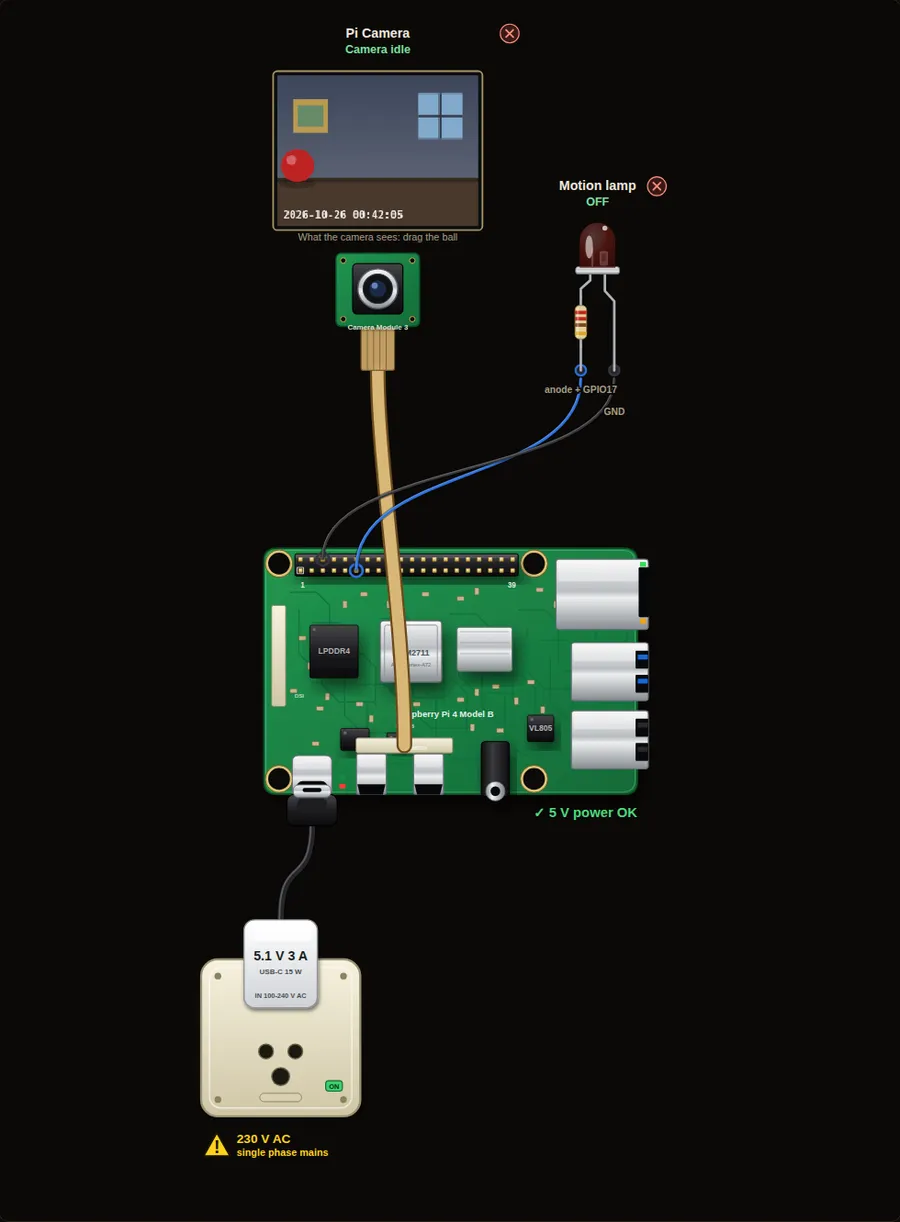
Compare each picture with the one before. If many pixels changed, something moved. This is how simple security cameras find movement without any extra sensor.
Privacy and safety. A camera records people. Tell everyone who lives in or visits the place, keep the pictures private, and delete old ones. Switch the Pi off before you plug in or remove the camera ribbon cable.
Parts in this circuit
| Part | Type |
|---|---|
| Pi Camera | Pi Camera Module 3 |
| Motion lamp | LED |
Wiring, pin by pin
Red = 5 V, orange = 3.3 V, black = GND, other colours = signals. “Pin” is the position on the 40-pin header; the GPIO number is what the code uses. Power the Pi from a 5.1 V supply and wire with the power off.
| # | Colour | From (part and leg) | To (header pin) |
|---|---|---|---|
| 1 | Coloured | Motion lamp - anode + | Pin 11 (GPIO17) |
| 2 | Black | Motion lamp - cathode - | Pin 6 (GND) |
Python code (gpiozero)
from picamera2 import Picamera2
from gpiozero import LED
from time import sleep

cam = Picamera2()
cam.configure(cam.create_preview_configuration())
cam.start()
sleep(1)

lamp = LED(17)
last = cam.capture_array()          # the first picture to compare with
print("Watching. Press 'Walk left to right' in the inputs.")

while True:
    now = cam.capture_array()
    moved = now.changed(last)       # percent of pixels that changed
    last = now
    if moved > 1:
        print("MOTION! %.1f %% of the picture changed" % moved)
        lamp.on()
    else:
        lamp.off()
    sleep(0.2)
How the code works
- capture_array() gives the picture as a Frame object. In the simulator it is 40 by 30 pixels.
- now.changed(last) counts the pixels that are clearly different from the last picture and gives a percentage.
- Real cameras have noise: a few pixels change by themselves. The threshold (here 1 %) ignores those stray pixels, but a moving object changes many more.
- last = now keeps the newest picture for the next loop.
You will learn
- Reading a picture as numbers
- Comparing two pictures to find movement
- Choosing a threshold so noise does not trigger the alarm
Try this
- Press Walk left to right and watch the console.
- Raise the threshold to 10. Does a walking ball still switch the lamp on? Find the biggest value that still works.
- Make the lamp stay on for 3 seconds after the last motion.
On a real Pi
- On a real Pi use NumPy and OpenCV: cv2.absdiff and cv2.threshold do the same job on a full size picture much faster.
- Shadows and clouds change the light and can look like motion. Blur the picture and use a slightly higher threshold.
- Do not film people without telling them. Keep recordings private and delete old ones.
Parts to buy
The links open a search on each store, so you see what is in stock today. Check the model, voltage and price before you order.
| # | Item | Qty | Buy / compare |
|---|---|---|---|
| 1 | Raspberry Pi 4 Model B about 4000 to 9000 INR | 1 | Robu.in Amazon.in ThinkRobotics |
| 2 | Official 15 W USB-C power supply (5.1 V, 3 A) Do not use an old phone charger | 1 | Robu.in Amazon.in ThinkRobotics |
| 3 | microSD card 32 GB, class 10 / A1 (with Raspberry Pi OS) And a card reader to write it | 1 | Robu.in Amazon.in ThinkRobotics |
| 4 | 5 mm LED, red | 1 | Robu.in Amazon.in ThinkRobotics |
| 5 | 330 ohm resistor, 1/4 W One per LED | 1 | Robu.in Amazon.in ThinkRobotics |
| 6 | Raspberry Pi Camera Module 3 (12 MP, autofocus) Or a Camera Module 2 / HQ camera | 1 | Robu.in Amazon.in ThinkRobotics |
| 7 | CSI camera ribbon cable, 15-pin, 30 cm Check the port size of your board | 1 | Robu.in Amazon.in ThinkRobotics |
| 8 | Camera mount or small tripod | 1 | Robu.in Amazon.in ThinkRobotics |
| 9 | Dupont jumper wires, male-to-female, 20 cm (pack of 40) | 1 | Robu.in Amazon.in ThinkRobotics |
| 10 | Breadboard 830 points For resistors and shared GND / 5 V | 1 | Robu.in Amazon.in ThinkRobotics |
This is a learning tool. The simulator checks the program logic, not the electrical design. Never put more than 3.3 V on a GPIO pin.