
Engineering · Raspberry Pi · Project 27 of 47 · Camera and vision · Intermediate
Colour tracker that points a servo
The camera finds a red ball. A servo arm points to where the ball is. Move the ball left and right and the arm follows. The idea behind object tracking and vision robots.
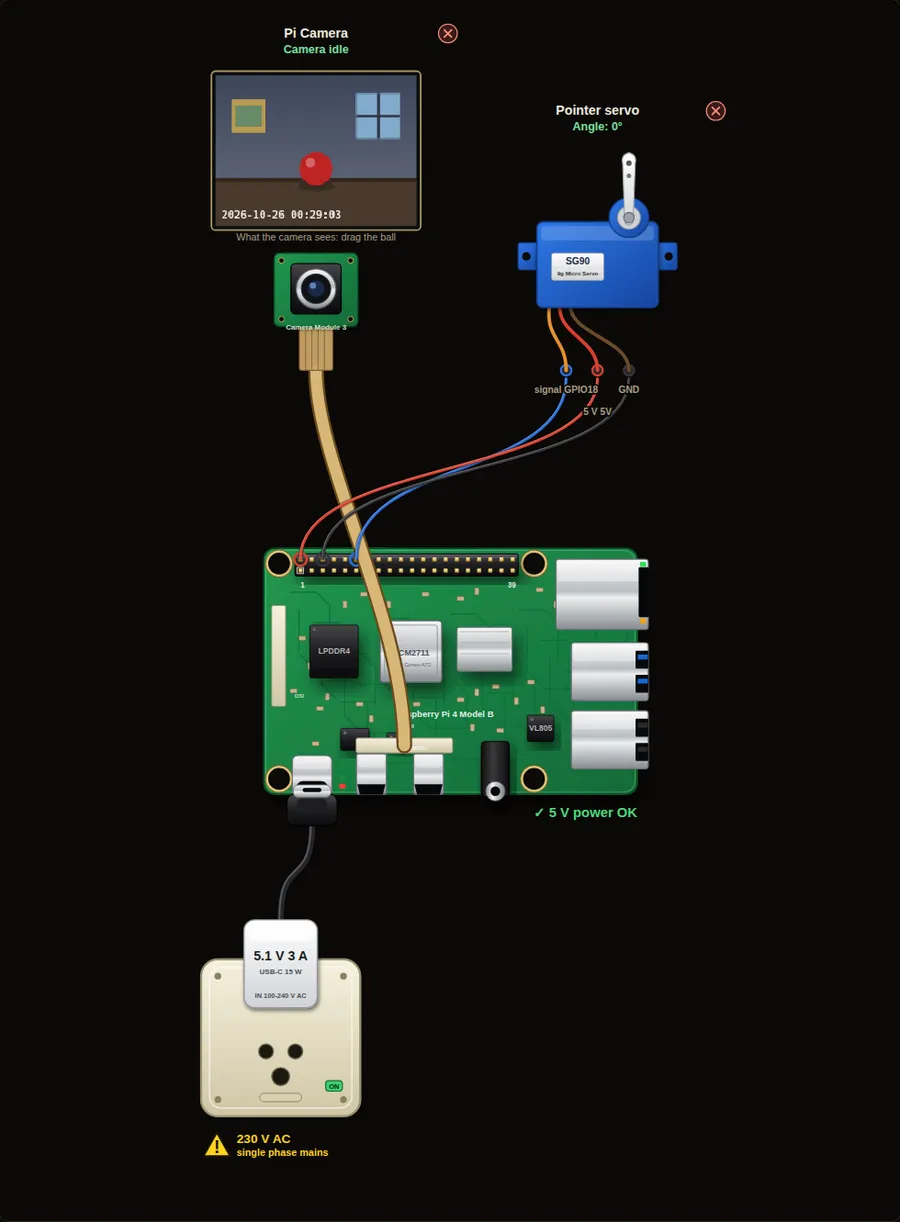
Privacy and safety. A camera records people. Tell everyone who lives in or visits the place, keep the pictures private, and delete old ones. Switch the Pi off before you plug in or remove the camera ribbon cable.
Parts in this circuit
| Part | Type |
|---|---|
| Pi Camera | Pi Camera Module 3 |
| Pointer servo | Servo |
Wiring, pin by pin
Red = 5 V, orange = 3.3 V, black = GND, other colours = signals. “Pin” is the position on the 40-pin header; the GPIO number is what the code uses. Power the Pi from a 5.1 V supply and wire with the power off.
| # | Colour | From (part and leg) | To (header pin) |
|---|---|---|---|
| 1 | Coloured | Pointer servo - signal | Pin 12 (GPIO18) |
| 2 | Red | Pointer servo - 5 V | Pin 2 (5V) |
| 3 | Black | Pointer servo - GND | Pin 6 (GND) |
Python code (gpiozero)
from picamera2 import Picamera2
from gpiozero import AngularServo
from time import sleep

cam = Picamera2()
cam.configure(cam.create_preview_configuration())
cam.start()
sleep(1)

servo = AngularServo(18, min_angle=-90, max_angle=90)

while True:
    frame = cam.capture_array()
    spot = frame.find_color("red")       # (x, y, area) or None
    if spot is None:
        print("No red ball in view")
    else:
        x, y, area = spot
        fraction = x / frame.width       # 0 = far left, 1 = far right
        servo.angle = -90 + fraction * 180
        print("Ball at %3d %%  ->  servo %4d degrees" % (fraction * 100, servo.angle))
    sleep(0.2)
How the code works
- find_color("red") looks for red pixels and gives their centre. It gives None when it finds nothing.
- The yellow cross on the camera view shows what the program found.
- x / frame.width turns the position into a number from 0 to 1 that does not depend on the picture size.
- -90 + fraction * 180 maps 0 to 1 onto -90 to +90 degrees.
You will learn
- Finding an object by its colour
- Turning a position in the picture into a servo angle
- Handling the case when the object is not there
Try this
- Drag the ball slowly across the view and watch the servo arm.
- Choose a green ball. Change the code to find "green".
- Use y instead of x so that the servo follows the ball up and down.
On a real Pi
- On a real Pi find the colour with OpenCV: convert to HSV, use cv2.inRange, then cv2.moments for the centre.
- A real pan-tilt camera moves the CAMERA, so the ball stays in the middle. That is a feedback loop: move a little towards the ball each time.
- Power the servo from its own 5 V supply when you use bigger servos. Join the GND.
Parts to buy
The links open a search on each store, so you see what is in stock today. Check the model, voltage and price before you order.
| # | Item | Qty | Buy / compare |
|---|---|---|---|
| 1 | Raspberry Pi 4 Model B about 4000 to 9000 INR | 1 | Robu.in Amazon.in ThinkRobotics |
| 2 | Official 15 W USB-C power supply (5.1 V, 3 A) Do not use an old phone charger | 1 | Robu.in Amazon.in ThinkRobotics |
| 3 | microSD card 32 GB, class 10 / A1 (with Raspberry Pi OS) And a card reader to write it | 1 | Robu.in Amazon.in ThinkRobotics |
| 4 | Raspberry Pi Camera Module 3 (12 MP, autofocus) Or a Camera Module 2 / HQ camera | 1 | Robu.in Amazon.in ThinkRobotics |
| 5 | CSI camera ribbon cable, 15-pin, 30 cm Check the port size of your board | 1 | Robu.in Amazon.in ThinkRobotics |
| 6 | Camera mount or small tripod | 1 | Robu.in Amazon.in ThinkRobotics |
| 7 | SG90 micro servo | 1 | Robu.in Amazon.in ThinkRobotics |
| 8 | Dupont jumper wires, male-to-female, 20 cm (pack of 40) | 1 | Robu.in Amazon.in ThinkRobotics |
| 9 | Breadboard 830 points For resistors and shared GND / 5 V | 1 | Robu.in Amazon.in ThinkRobotics |
This is a learning tool. The simulator checks the program logic, not the electrical design. Never put more than 3.3 V on a GPIO pin.