
Engineering · Raspberry Pi · Project 28 of 47 · Camera and vision · Beginner
Colour detector with three LEDs
Show a red, green or blue ball to the camera. The matching LED lights up. A simple colour sorter, like the ones that check fruit or plastic parts on a belt.
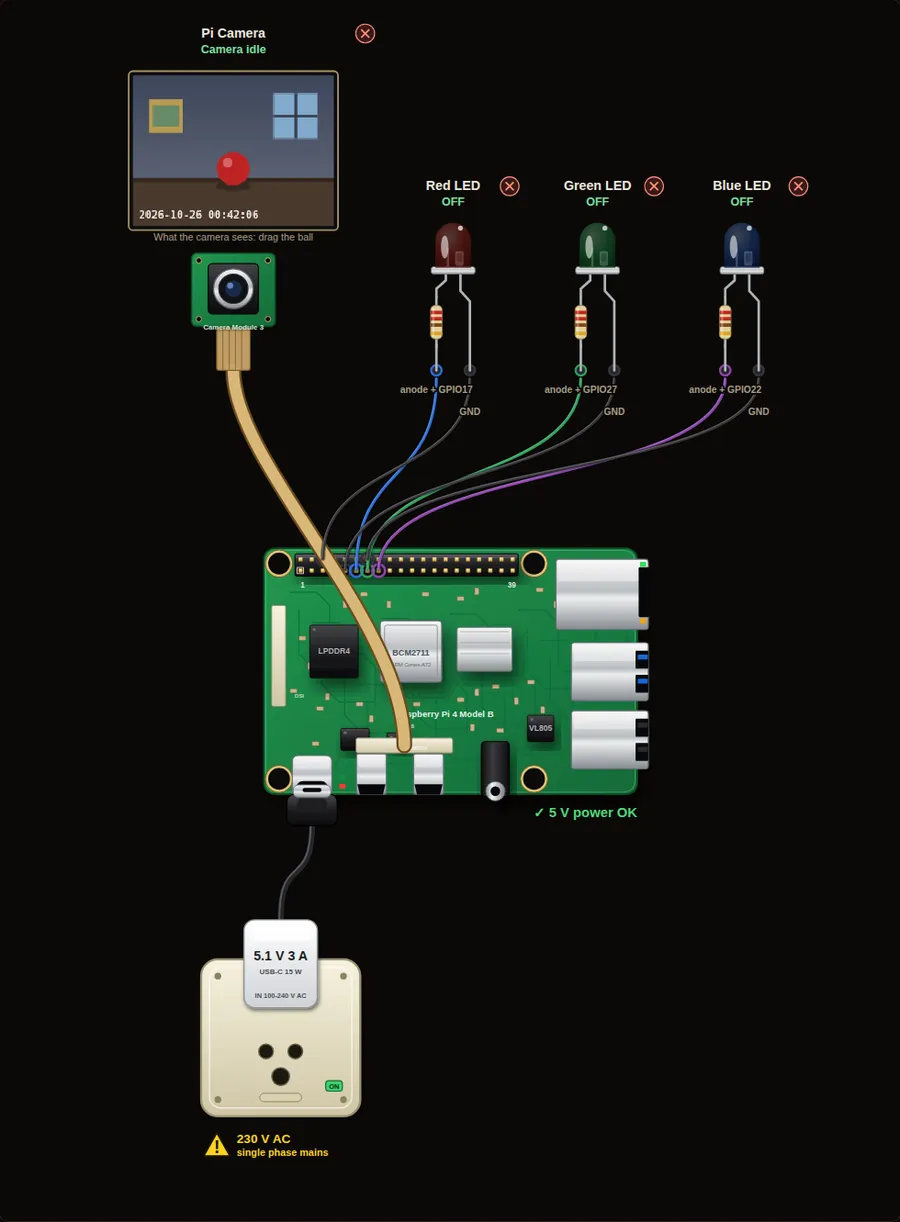
Privacy and safety. A camera records people. Tell everyone who lives in or visits the place, keep the pictures private, and delete old ones. Switch the Pi off before you plug in or remove the camera ribbon cable.
Parts in this circuit
| Part | Type |
|---|---|
| Pi Camera | Pi Camera Module 3 |
| Red LED | LED |
| Green LED | LED |
| Blue LED | LED |
Wiring, pin by pin
Red = 5 V, orange = 3.3 V, black = GND, other colours = signals. “Pin” is the position on the 40-pin header; the GPIO number is what the code uses. Power the Pi from a 5.1 V supply and wire with the power off.
| # | Colour | From (part and leg) | To (header pin) |
|---|---|---|---|
| 1 | Coloured | Red LED - anode + | Pin 11 (GPIO17) |
| 2 | Black | Red LED - cathode - | Pin 6 (GND) |
| 3 | Coloured | Green LED - anode + | Pin 13 (GPIO27) |
| 4 | Black | Green LED - cathode - | Pin 9 (GND) |
| 5 | Coloured | Blue LED - anode + | Pin 15 (GPIO22) |
| 6 | Black | Blue LED - cathode - | Pin 14 (GND) |
Python code (gpiozero)
from picamera2 import Picamera2
from gpiozero import LED
from time import sleep

cam = Picamera2()
cam.configure(cam.create_preview_configuration())
cam.start()
sleep(1)

leds = {"red": LED(17), "green": LED(27), "blue": LED(22)}
last = None

while True:
    frame = cam.capture_array()
    seen = "nothing"
    for name, led in leds.items():
        if frame.find_color(name):
            led.on()
            seen = name
        else:
            led.off()
    if seen != last:                  # print only when it changes
        print("I see:", seen)
        last = seen
    sleep(0.3)
How the code works
- leds is a dictionary: the name "red" belongs to the LED on GPIO17.
- The for loop asks the camera picture about each colour in turn and switches the matching LED.
- seen and last make the console quiet: it prints a line only when the colour changes.
You will learn
- A dictionary that joins a colour name to an LED
- Looping over several items
- Printing only when something changes
Try this
- Press the Ball: green and Ball: blue buttons.
- Take the ball out of view. All LEDs should go off.
- Lower the room light to 15 %. Can the camera still see the colour?
On a real Pi
- Colour depends on the light. A white LED ring or a closed box gives the same light every time, which is how factories do it.
- Use HSV colours in OpenCV: they are much more stable than RGB when the light changes.
- For sorting real parts, send the result to a servo gate or a relay (see the Conveyor sorter project).
Parts to buy
The links open a search on each store, so you see what is in stock today. Check the model, voltage and price before you order.
| # | Item | Qty | Buy / compare |
|---|---|---|---|
| 1 | Raspberry Pi 4 Model B about 4000 to 9000 INR | 1 | Robu.in Amazon.in ThinkRobotics |
| 2 | Official 15 W USB-C power supply (5.1 V, 3 A) Do not use an old phone charger | 1 | Robu.in Amazon.in ThinkRobotics |
| 3 | microSD card 32 GB, class 10 / A1 (with Raspberry Pi OS) And a card reader to write it | 1 | Robu.in Amazon.in ThinkRobotics |
| 4 | 5 mm LED, red | 1 | Robu.in Amazon.in ThinkRobotics |
| 5 | 5 mm LED, green | 1 | Robu.in Amazon.in ThinkRobotics |
| 6 | 5 mm LED, blue | 1 | Robu.in Amazon.in ThinkRobotics |
| 7 | 330 ohm resistor, 1/4 W One per LED | 3 | Robu.in Amazon.in ThinkRobotics |
| 8 | Raspberry Pi Camera Module 3 (12 MP, autofocus) Or a Camera Module 2 / HQ camera | 1 | Robu.in Amazon.in ThinkRobotics |
| 9 | CSI camera ribbon cable, 15-pin, 30 cm Check the port size of your board | 1 | Robu.in Amazon.in ThinkRobotics |
| 10 | Camera mount or small tripod | 1 | Robu.in Amazon.in ThinkRobotics |
| 11 | Dupont jumper wires, male-to-female, 20 cm (pack of 40) | 1 | Robu.in Amazon.in ThinkRobotics |
| 12 | Breadboard 830 points For resistors and shared GND / 5 V | 1 | Robu.in Amazon.in ThinkRobotics |
This is a learning tool. The simulator checks the program logic, not the electrical design. Never put more than 3.3 V on a GPIO pin.