
Engineering · Raspberry Pi · Project 43 of 47 · Smart farm and energy · Intermediate
Cold-room temperature alarm
A cold store keeps fruit and vegetables fresh. If the temperature stays above 8 degrees for 5 readings in a row, a red lamp and a buzzer raise the alarm.
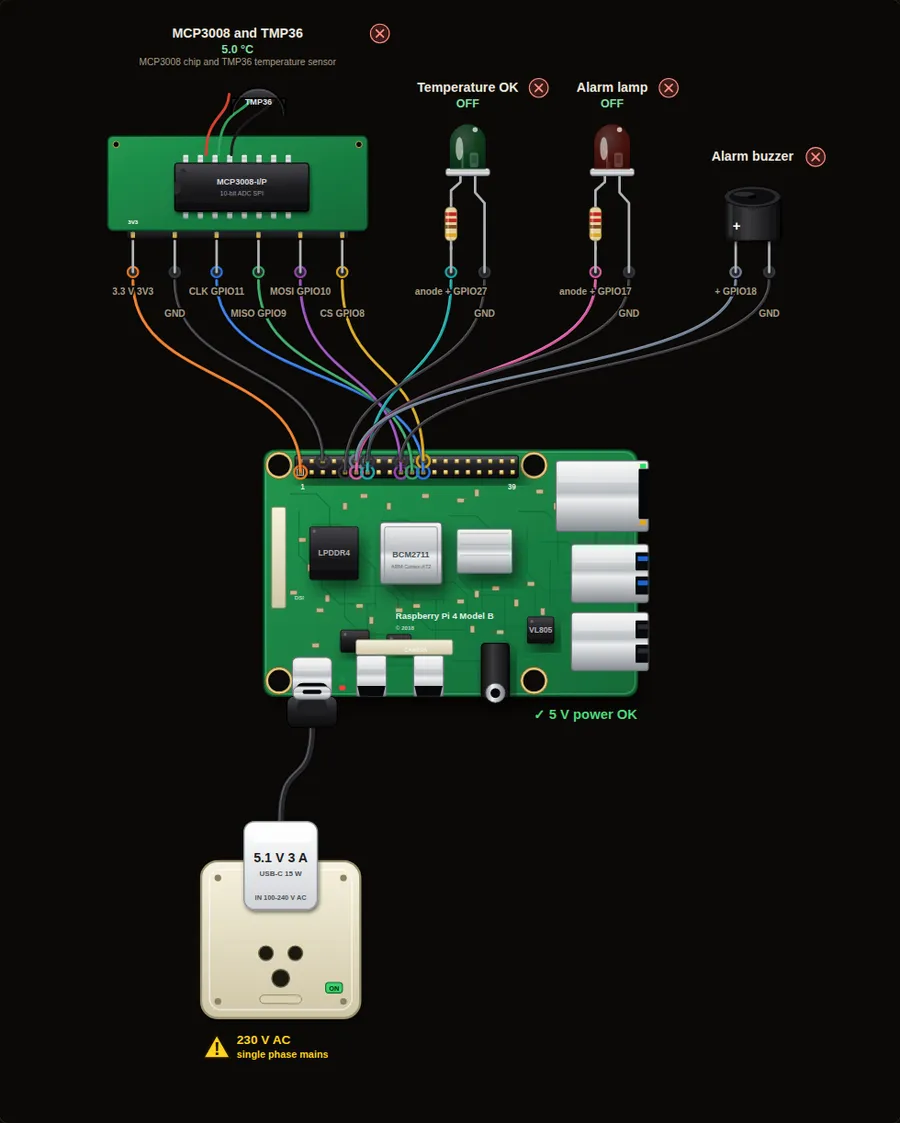
Parts in this circuit
| Part | Type |
|---|---|
| MCP3008 and TMP36 | MCP3008 + TMP36 |
| Temperature OK | LED |
| Alarm lamp | LED |
| Alarm buzzer | Buzzer |
Wiring, pin by pin
Red = 5 V, orange = 3.3 V, black = GND, other colours = signals. “Pin” is the position on the 40-pin header; the GPIO number is what the code uses. Power the Pi from a 5.1 V supply and wire with the power off.
| # | Colour | From (part and leg) | To (header pin) |
|---|---|---|---|
| 1 | Orange | MCP3008 and TMP36 - 3.3 V | Pin 1 (3V3) |
| 2 | Black | MCP3008 and TMP36 - GND | Pin 6 (GND) |
| 3 | Coloured | MCP3008 and TMP36 - CLK | Pin 23 (GPIO11) |
| 4 | Coloured | MCP3008 and TMP36 - MISO | Pin 21 (GPIO9) |
| 5 | Coloured | MCP3008 and TMP36 - MOSI | Pin 19 (GPIO10) |
| 6 | Coloured | MCP3008 and TMP36 - CS | Pin 24 (GPIO8) |
| 7 | Coloured | Temperature OK - anode + | Pin 13 (GPIO27) |
| 8 | Black | Temperature OK - cathode - | Pin 9 (GND) |
| 9 | Coloured | Alarm lamp - anode + | Pin 11 (GPIO17) |
| 10 | Black | Alarm lamp - cathode - | Pin 14 (GND) |
| 11 | Coloured | Alarm buzzer - + | Pin 12 (GPIO18) |
| 12 | Black | Alarm buzzer - - | Pin 20 (GND) |
Python code (gpiozero)
from gpiozero import MCP3008, LED, Buzzer
from time import sleep

sensor = MCP3008(channel=0)
ok = LED(27)
alarm = LED(17)
buzzer = Buzzer(18)

LIMIT = 8                  # degrees C
HOT_READINGS = 5           # how many readings in a row must be hot
hot = 0

while True:
    temp = (sensor.value * 3.3 - 0.5) * 100
    if temp > LIMIT:
        hot += 1
    else:
        hot = 0
    if hot >= HOT_READINGS:
        ok.off()
        alarm.on()
        buzzer.on()
        print("ALARM! %.1f C for %d readings" % (temp, hot))
    else:
        ok.on()
        alarm.off()
        buzzer.off()
        print("%.1f C  (hot readings: %d)" % (temp, hot))
    sleep(1)
How the code works
- hot counts the readings in a row above the limit. Any normal reading sets it back to zero.
- A short door opening makes one hot reading only, so it does not trigger the alarm.
- Only after 5 hot readings do the lamp and the buzzer start.
You will learn
- Counting how long something stays true
- Avoiding false alarms
- Showing status with LEDs
Try this
- Slide the temperature to 15 degrees and wait 5 seconds.
- Slide it to 15 for 2 seconds, then back to 5. No alarm should sound.
- Make the alarm latch: it should stay on until a reset button is pressed.
On a real Pi
- Cold stores for food need a calibrated, waterproof sensor (for example a PT100 or DS18B20 in a probe).
- Send the alarm to a phone, because nobody listens to a buzzer at night. A message needs Wi-Fi, which the simulator does not have.
- Log the temperature to a file for food safety records.
Parts to buy
The links open a search on each store, so you see what is in stock today. Check the model, voltage and price before you order.
| # | Item | Qty | Buy / compare |
|---|---|---|---|
| 1 | Raspberry Pi 4 Model B about 4000 to 9000 INR | 1 | Robu.in Amazon.in ThinkRobotics |
| 2 | Official 15 W USB-C power supply (5.1 V, 3 A) Do not use an old phone charger | 1 | Robu.in Amazon.in ThinkRobotics |
| 3 | microSD card 32 GB, class 10 / A1 (with Raspberry Pi OS) And a card reader to write it | 1 | Robu.in Amazon.in ThinkRobotics |
| 4 | 5 mm LED, red | 1 | Robu.in Amazon.in ThinkRobotics |
| 5 | 5 mm LED, green | 1 | Robu.in Amazon.in ThinkRobotics |
| 6 | 330 ohm resistor, 1/4 W One per LED | 2 | Robu.in Amazon.in ThinkRobotics |
| 7 | Active buzzer, 5 V | 1 | Robu.in Amazon.in ThinkRobotics |
| 8 | MCP3008 8-channel 10-bit ADC (DIP-16) One chip can read 8 sensors | 1 | Robu.in Amazon.in ThinkRobotics |
| 9 | TMP36 temperature sensor | 1 | Robu.in Amazon.in ThinkRobotics |
| 10 | Dupont jumper wires, male-to-female, 20 cm (pack of 40) | 1 | Robu.in Amazon.in ThinkRobotics |
| 11 | Breadboard 830 points For resistors and shared GND / 5 V | 1 | Robu.in Amazon.in ThinkRobotics |
This is a learning tool. The simulator checks the program logic, not the electrical design. Never put more than 3.3 V on a GPIO pin.