
Engineering · Raspberry Pi · Project 42 of 47 · Smart farm and energy · Intermediate
Solar panel tracker with two LDRs
Two light sensors sit on the left and right of a panel. A servo turns the panel towards the brighter side until both sensors see the same light.
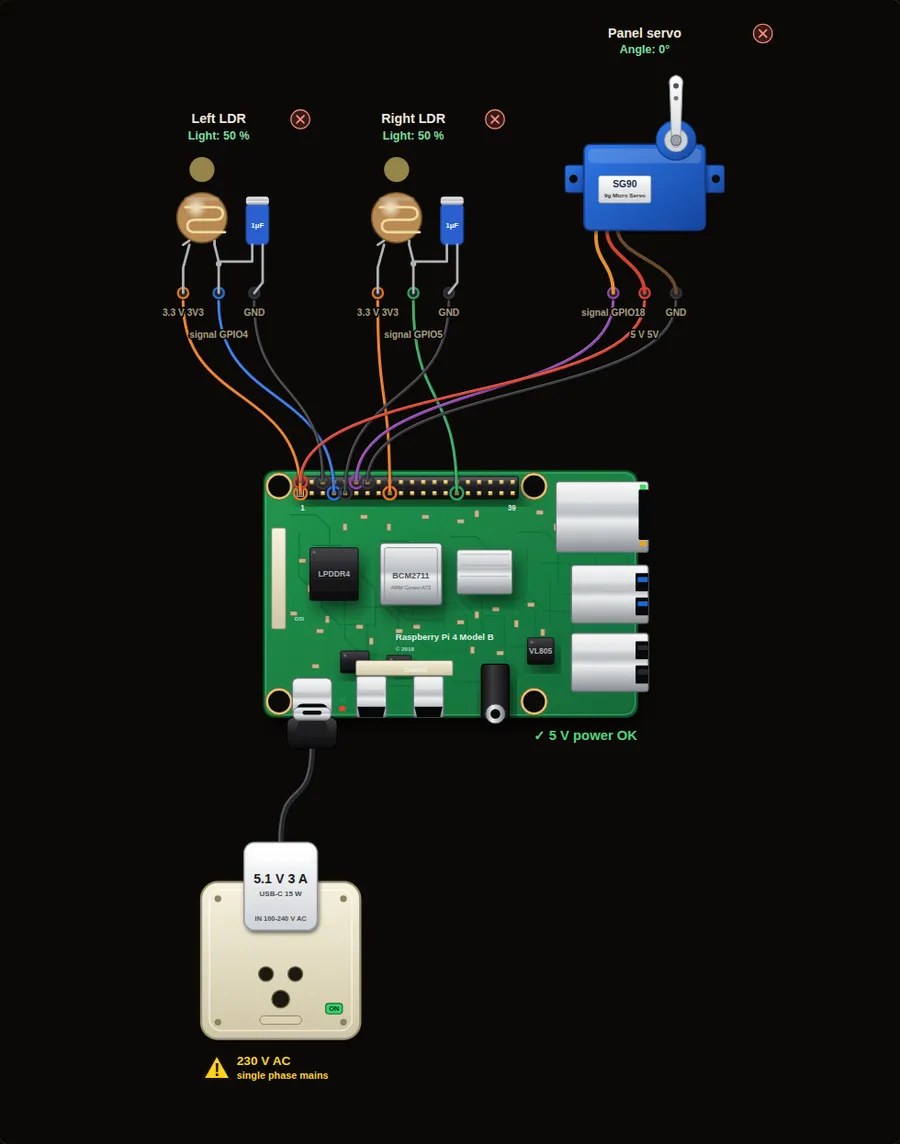
Parts in this circuit
| Part | Type |
|---|---|
| Left LDR | Light sensor |
| Right LDR | Light sensor |
| Panel servo | Servo |
Wiring, pin by pin
Red = 5 V, orange = 3.3 V, black = GND, other colours = signals. “Pin” is the position on the 40-pin header; the GPIO number is what the code uses. Power the Pi from a 5.1 V supply and wire with the power off.
| # | Colour | From (part and leg) | To (header pin) |
|---|---|---|---|
| 1 | Orange | Left LDR - 3.3 V | Pin 1 (3V3) |
| 2 | Coloured | Left LDR - signal | Pin 7 (GPIO4) |
| 3 | Black | Left LDR - GND | Pin 6 (GND) |
| 4 | Orange | Right LDR - 3.3 V | Pin 17 (3V3) |
| 5 | Coloured | Right LDR - signal | Pin 29 (GPIO5) |
| 6 | Black | Right LDR - GND | Pin 9 (GND) |
| 7 | Coloured | Panel servo - signal | Pin 12 (GPIO18) |
| 8 | Red | Panel servo - 5 V | Pin 2 (5V) |
| 9 | Black | Panel servo - GND | Pin 14 (GND) |
Python code (gpiozero)
from gpiozero import LightSensor, AngularServo
from time import sleep

left = LightSensor(4)
right = LightSensor(5)
panel = AngularServo(18, min_angle=-90, max_angle=90)

angle = 0
panel.angle = angle

while True:
    error = right.value - left.value          # positive: right side is brighter
    if abs(error) > 0.1:                      # a dead band stops jitter
        angle += 5 if error > 0 else -5
        angle = max(-90, min(90, angle))      # stay inside the servo range
        panel.angle = angle
    print("Left %.2f  Right %.2f  Panel %d deg" % (left.value, right.value, angle))
    sleep(0.5)
How the code works
- error is the difference between right and left light. Zero means the panel faces the sun.
- The panel moves 5 degrees at a time towards the brighter side. That is a simple feedback loop.
- The dead band of 0.1 stops the servo from shaking when both sensors are nearly equal.
- max() and min() keep the angle between -90 and +90.
You will learn
- Comparing two sensors
- A control loop that corrects a little each time
- Dead band and limits
Try this
- Move the Left LDR slider to 90 % and the right one to 20 %. Watch the panel turn.
- Make both the same. Does the panel stop?
- Change the step from 5 to 2 degrees. What changes?
On a real Pi
- In the simulator the panel does not change the light on the sensors. On a real tracker it does, and that closes the loop.
- A real panel is heavy and needs a strong motor or linear actuator, not a hobby servo.
- Single-axis trackers can add 20 to 30 % energy. Check that the energy used by the motor is small.
Parts to buy
The links open a search on each store, so you see what is in stock today. Check the model, voltage and price before you order.
| # | Item | Qty | Buy / compare |
|---|---|---|---|
| 1 | Raspberry Pi 4 Model B about 4000 to 9000 INR | 1 | Robu.in Amazon.in ThinkRobotics |
| 2 | Official 15 W USB-C power supply (5.1 V, 3 A) Do not use an old phone charger | 1 | Robu.in Amazon.in ThinkRobotics |
| 3 | microSD card 32 GB, class 10 / A1 (with Raspberry Pi OS) And a card reader to write it | 1 | Robu.in Amazon.in ThinkRobotics |
| 4 | SG90 micro servo | 1 | Robu.in Amazon.in ThinkRobotics |
| 5 | LDR (GL5528) photoresistor | 2 | Robu.in Amazon.in ThinkRobotics |
| 6 | 1 µF capacitor | 2 | Robu.in Amazon.in ThinkRobotics |
| 7 | Dupont jumper wires, male-to-female, 20 cm (pack of 40) | 1 | Robu.in Amazon.in ThinkRobotics |
| 8 | Breadboard 830 points For resistors and shared GND / 5 V | 1 | Robu.in Amazon.in ThinkRobotics |
This is a learning tool. The simulator checks the program logic, not the electrical design. Never put more than 3.3 V on a GPIO pin.