
Engineering · Raspberry Pi · Project 44 of 47 · Smart farm and energy · Beginner
Sunshine meter with an LED bar
One LDR measures the daylight. The LED bar shows how sunny it is, from one LED (dark) to five (bright). Useful for choosing the best place for a solar panel or plants.
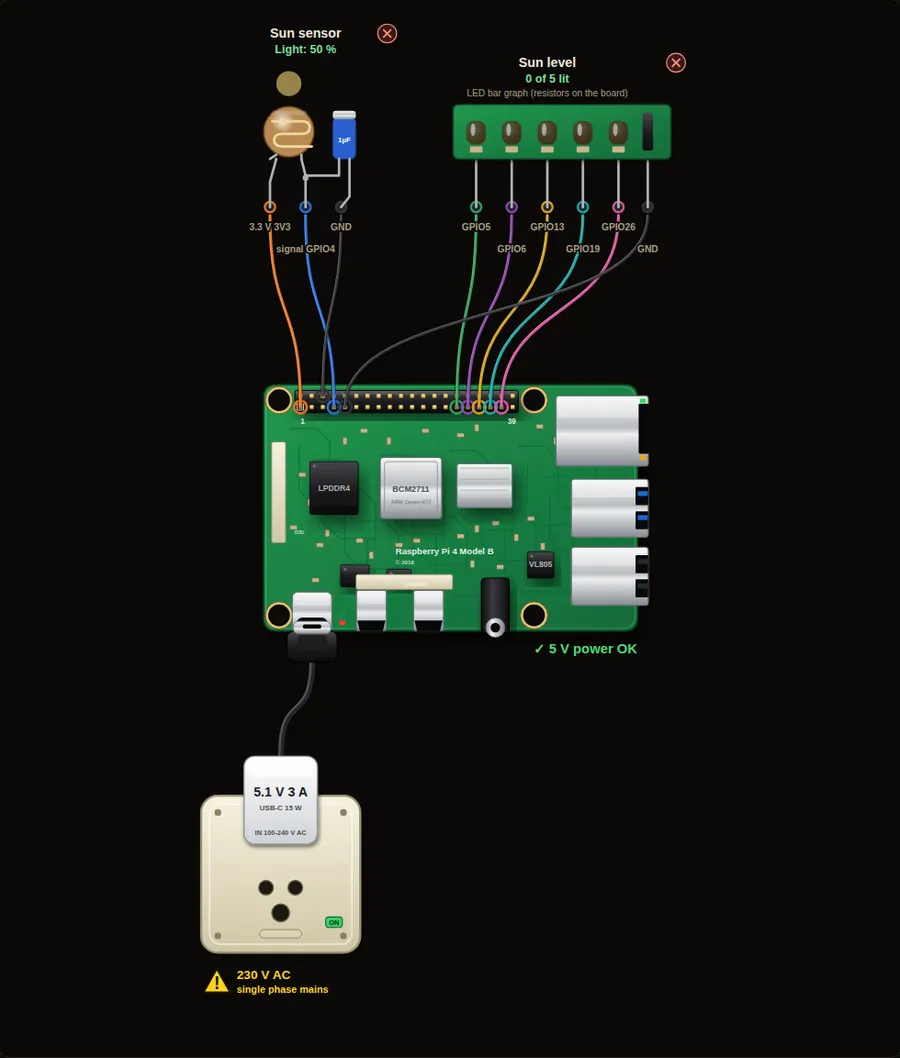
Parts in this circuit
| Part | Type |
|---|---|
| Sun sensor | Light sensor |
| Sun level | LED bar |
Wiring, pin by pin
Red = 5 V, orange = 3.3 V, black = GND, other colours = signals. “Pin” is the position on the 40-pin header; the GPIO number is what the code uses. Power the Pi from a 5.1 V supply and wire with the power off.
| # | Colour | From (part and leg) | To (header pin) |
|---|---|---|---|
| 1 | Orange | Sun sensor - 3.3 V | Pin 1 (3V3) |
| 2 | Coloured | Sun sensor - signal | Pin 7 (GPIO4) |
| 3 | Black | Sun sensor - GND | Pin 6 (GND) |
| 4 | Coloured | Sun level - Signal | Pin 29 (GPIO5) |
| 5 | Coloured | Sun level - Signal | Pin 31 (GPIO6) |
| 6 | Coloured | Sun level - Signal | Pin 33 (GPIO13) |
| 7 | Coloured | Sun level - Signal | Pin 35 (GPIO19) |
| 8 | Coloured | Sun level - Signal | Pin 37 (GPIO26) |
| 9 | Black | Sun level - GND | Pin 9 (GND) |
Python code (gpiozero)
from gpiozero import LightSensor, LEDBarGraph
from time import sleep

sun = LightSensor(4)
bar = LEDBarGraph(5, 6, 13, 19, 26)

while True:
    level = sun.value                         # 0.0 = dark, 1.0 = full sun
    bar.value = level                         # the bar shows the same fraction
    print("Sunshine: %d %%" % (level * 100))
    sleep(0.5)
How the code works
- sun.value is a number from 0 (dark) to 1 (very bright).
- bar.value takes the same range, so no maths is needed.
- A value of 0.4 lights two of the five LEDs.
You will learn
- Reading a light sensor as a number
- Showing a value on an LED bar
- Mapping 0 to 1 onto a display
Try this
- Slide the Daylight slider and watch the bar.
- Print the best (maximum) reading of the last 20 readings.
- Light a buzzer when the sun is above 90 %.
On a real Pi
- An LDR is not accurate and changes with temperature. For real solar work use a lux sensor (BH1750) or a small reference solar cell.
- Shade the LDR from other lamps, or the reading means nothing.
- The Pi reads an LDR by timing a capacitor. A 1 uF capacitor is needed.
Parts to buy
The links open a search on each store, so you see what is in stock today. Check the model, voltage and price before you order.
| # | Item | Qty | Buy / compare |
|---|---|---|---|
| 1 | Raspberry Pi 4 Model B about 4000 to 9000 INR | 1 | Robu.in Amazon.in ThinkRobotics |
| 2 | Official 15 W USB-C power supply (5.1 V, 3 A) Do not use an old phone charger | 1 | Robu.in Amazon.in ThinkRobotics |
| 3 | microSD card 32 GB, class 10 / A1 (with Raspberry Pi OS) And a card reader to write it | 1 | Robu.in Amazon.in ThinkRobotics |
| 4 | 330 ohm resistor, 1/4 W One per LED | 5 | Robu.in Amazon.in ThinkRobotics |
| 5 | LED bar graph module (5 LEDs) | 1 | Robu.in Amazon.in ThinkRobotics |
| 6 | LDR (GL5528) photoresistor | 1 | Robu.in Amazon.in ThinkRobotics |
| 7 | 1 µF capacitor | 1 | Robu.in Amazon.in ThinkRobotics |
| 8 | Dupont jumper wires, male-to-female, 20 cm (pack of 40) | 1 | Robu.in Amazon.in ThinkRobotics |
| 9 | Breadboard 830 points For resistors and shared GND / 5 V | 1 | Robu.in Amazon.in ThinkRobotics |
This is a learning tool. The simulator checks the program logic, not the electrical design. Never put more than 3.3 V on a GPIO pin.