
Engineering · Raspberry Pi · Project 13 of 47 · Home automation · Beginner
Wall switch with a relay
A Pi pin cannot power a lamp. A relay board is an electric switch that the Pi pin controls. Press the button to switch a lamp on and off, like a smart wall switch.
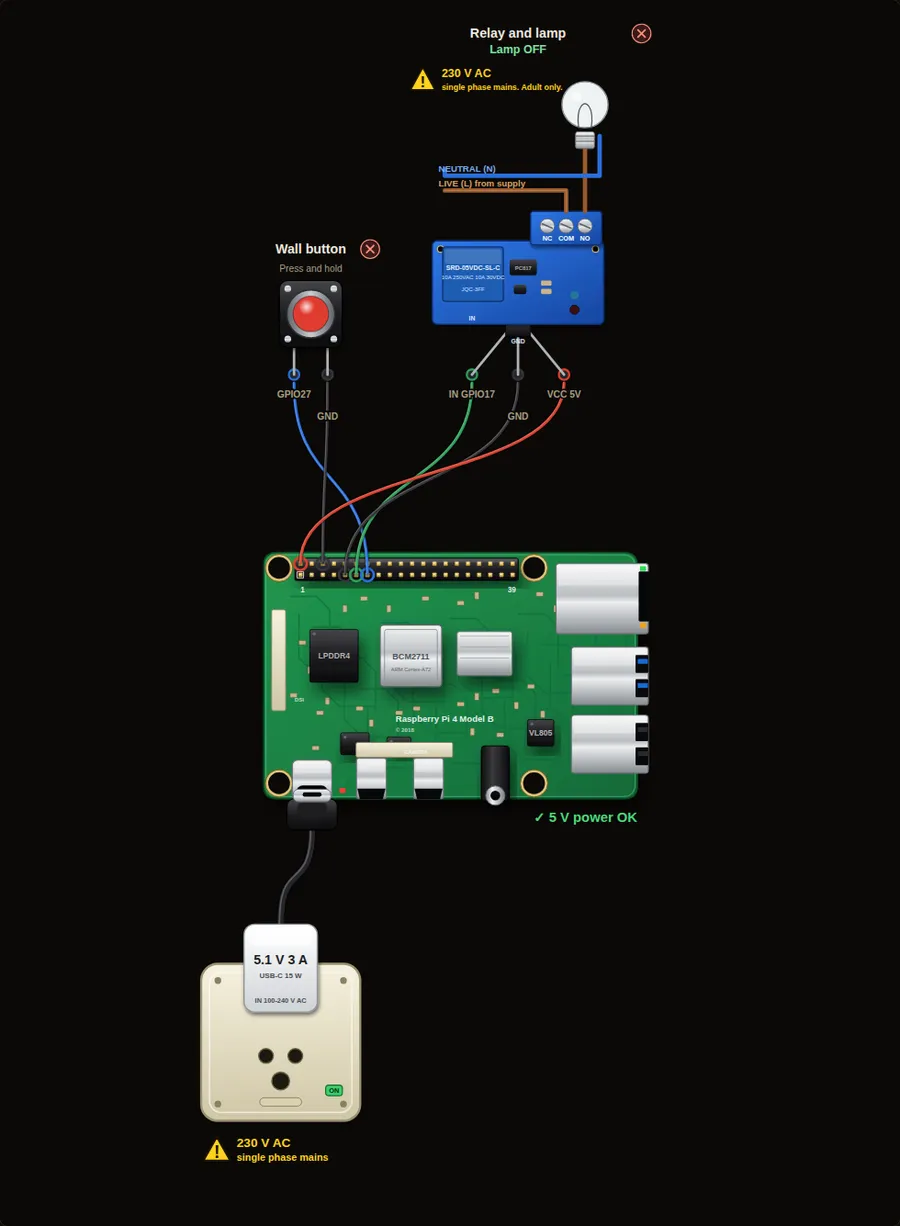
CAUTION: 230 V single-phase mains. The relay in this project switches a mains load (Live and Neutral, 230 V AC, 50 Hz in India). Mains can kill. Practise with the simulator or a low-voltage lamp. Build the mains side only with a qualified electrician, in a closed insulated box, behind a fuse or MCB and a 30 mA RCCB. Never touch the relay screw terminals while anything is connected.
Parts in this circuit
| Part | Type |
|---|---|
| Wall button | Push button |
| Relay and lamp | Relay module |
Wiring, pin by pin
Red = 5 V, orange = 3.3 V, black = GND, other colours = signals. “Pin” is the position on the 40-pin header; the GPIO number is what the code uses. Power the Pi from a 5.1 V supply and wire with the power off.
| # | Colour | From (part and leg) | To (header pin) |
|---|---|---|---|
| 1 | Coloured | Wall button - Signal | Pin 13 (GPIO27) |
| 2 | Black | Wall button - GND | Pin 6 (GND) |
| 3 | Coloured | Relay and lamp - IN | Pin 11 (GPIO17) |
| 4 | Black | Relay and lamp - GND | Pin 9 (GND) |
| 5 | Red | Relay and lamp - VCC | Pin 2 (5V) |
Python code (gpiozero)
from gpiozero import Button, OutputDevice
from signal import pause

# Most relay boards switch ON when the pin goes LOW.
# active_high=False hides this: relay.on() really switches the lamp on.
relay = OutputDevice(17, active_high=False)
button = Button(27)

def flip():
    relay.toggle()
    print("Lamp ON" if relay.value else "Lamp OFF")

button.when_pressed = flip
print("Press the wall button to switch the lamp")
pause()
How the code works
- A GPIO pin gives only a few milliamps. A relay board uses a small transistor and a coil, so a tiny signal can switch a big load.
- The lamp is wired through the relay contacts, not through the Pi. The Pi only sends the signal on the IN pin.
- Many cheap relay boards are active low: the relay clicks ON when the pin is LOW. active_high=False tells gpiozero about this, so your code can still say on() and off().
- when_pressed calls flip() each time the button goes down, and toggle() reverses the relay.
You will learn
- Why a relay is needed for lamps, fans and pumps
- Active-low relay boards and active_high=False
- toggle() and button events
Try this
- Press the button several times and watch the red relay LED.
- Change active_high=False to True and run again: the lamp now behaves the opposite way, just like a real board with the wrong setting.
- Print how many times the lamp has been switched on.
On a real Pi
- The mains side (230 V or 120 V) can kill. Use a relay module that is rated for your voltage, a proper enclosure, and ask a qualified electrician to wire it. Practise with a 5 V or 12 V lamp first.
- Power the relay coil from the 5 V pin (or an external supply for several relays). Share GND with the Pi.
- A relay clicks and wears out: do not switch it faster than once every few seconds.
Parts to buy
The links open a search on each store, so you see what is in stock today. Check the model, voltage and price before you order.
| # | Item | Qty | Buy / compare |
|---|---|---|---|
| 1 | Raspberry Pi 4 Model B about 4000 to 9000 INR | 1 | Robu.in Amazon.in ThinkRobotics |
| 2 | Official 15 W USB-C power supply (5.1 V, 3 A) Do not use an old phone charger | 1 | Robu.in Amazon.in ThinkRobotics |
| 3 | microSD card 32 GB, class 10 / A1 (with Raspberry Pi OS) And a card reader to write it | 1 | Robu.in Amazon.in ThinkRobotics |
| 4 | Tactile push button (12 mm, with cap) | 1 | Robu.in Amazon.in ThinkRobotics |
| 5 | 1-channel 5 V relay module with optocoupler 10 A 250 V AC contacts | 1 | Robu.in Amazon.in ThinkRobotics |
| 6 | 230 V LED bulb (9 W) with holder and wire | 1 | Robu.in Amazon.in ThinkRobotics |
| 7 | Closed ABS enclosure (IP54) for the mains side | 1 | Robu.in Amazon.in ThinkRobotics |
| 8 | 3-way screw terminal block (rated 10 A) | 1 | Robu.in Amazon.in ThinkRobotics |
| 9 | MCB 6 A single pole and RCCB 30 mA (by an electrician) Mains protection | 1 | Robu.in Amazon.in ThinkRobotics |
| 10 | Dupont jumper wires, male-to-female, 20 cm (pack of 40) | 1 | Robu.in Amazon.in ThinkRobotics |
| 11 | Breadboard 830 points For resistors and shared GND / 5 V | 1 | Robu.in Amazon.in ThinkRobotics |
This is a learning tool. The simulator checks the program logic, not the electrical design. Never put more than 3.3 V on a GPIO pin.