
Engineering · Raspberry Pi · Project 12 of 47 · Games and logic · Beginner
Reaction time game
Wait for the LED to light, then hit the button as fast as you can. The Pi measures your reaction time in milliseconds.
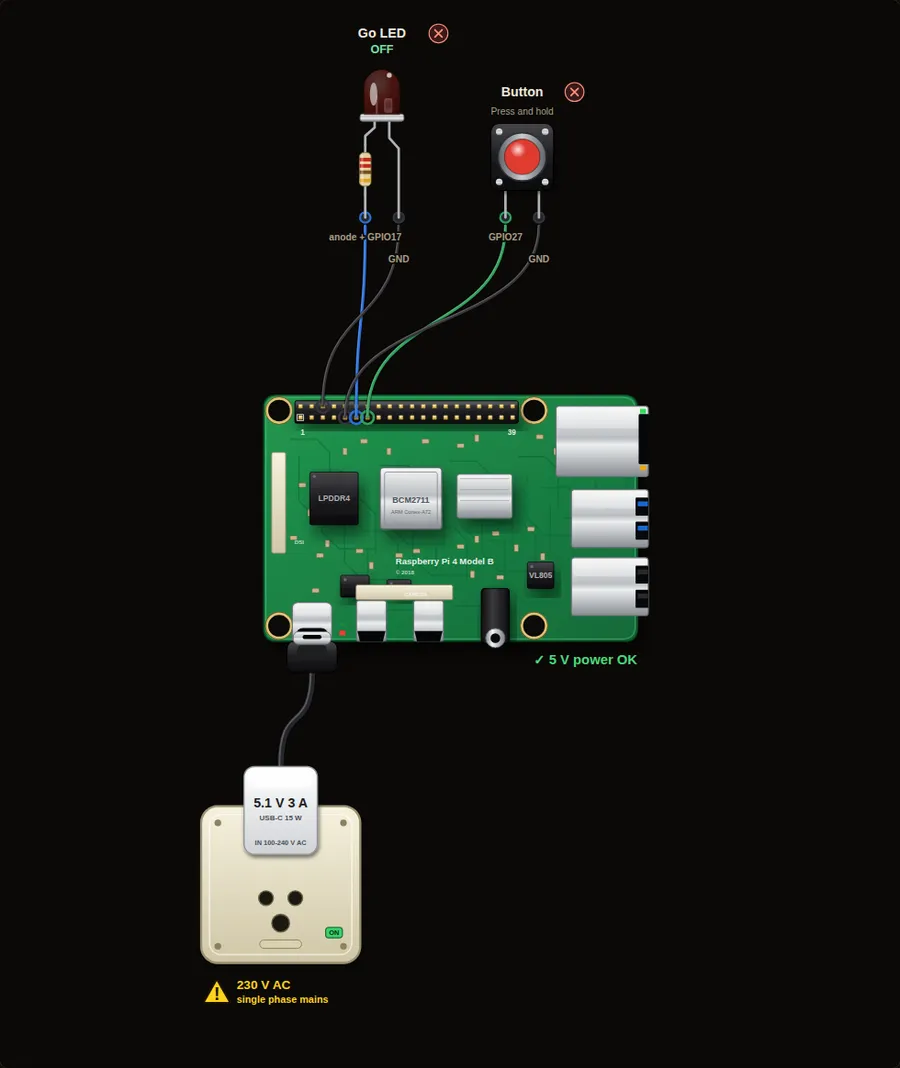
Parts in this circuit
| Part | Type |
|---|---|
| Go LED | LED |
| Button | Push button |
Wiring, pin by pin
Red = 5 V, orange = 3.3 V, black = GND, other colours = signals. “Pin” is the position on the 40-pin header; the GPIO number is what the code uses. Power the Pi from a 5.1 V supply and wire with the power off.
| # | Colour | From (part and leg) | To (header pin) |
|---|---|---|---|
| 1 | Coloured | Go LED - anode + | Pin 11 (GPIO17) |
| 2 | Black | Go LED - cathode - | Pin 6 (GND) |
| 3 | Coloured | Button - Signal | Pin 13 (GPIO27) |
| 4 | Black | Button - GND | Pin 9 (GND) |
Python code (gpiozero)
from gpiozero import LED, Button
from time import sleep, time
from random import uniform

led = LED(17)
button = Button(27)

print("Reaction game: press the button as soon as the LED lights.")

while True:
    led.off()
    print("Get ready...")
    sleep(uniform(2, 5))              # random wait of 2 to 5 seconds
    led.on()
    start = time()                    # note the time
    button.wait_for_press()
    reaction = (time() - start) * 1000
    led.off()
    print("Your reaction time:", round(reaction), "ms")
    button.wait_for_release()
    sleep(1.5)
How the code works
- uniform(2, 5) picks a random wait so you cannot guess when the LED will light.
- time() gives the clock in seconds. The difference between two times is the reaction time.
- Multiplying by 1000 turns seconds into milliseconds.
You will learn
- Random numbers
- Measuring time with time()
- Combining waiting, timing and printing
Try this
- Keep a best time and print "New record!" when you beat it.
- Add a false start check: if the button is pressed before the LED, print "Too early!".
- Use two buttons and make it a two-player game.
On a real Pi
- A typical human reaction is 200 to 300 ms. Python on a Pi adds about a millisecond, so this is accurate enough for a game.
Parts to buy
The links open a search on each store, so you see what is in stock today. Check the model, voltage and price before you order.
| # | Item | Qty | Buy / compare |
|---|---|---|---|
| 1 | Raspberry Pi 4 Model B about 4000 to 9000 INR | 1 | Robu.in Amazon.in ThinkRobotics |
| 2 | Official 15 W USB-C power supply (5.1 V, 3 A) Do not use an old phone charger | 1 | Robu.in Amazon.in ThinkRobotics |
| 3 | microSD card 32 GB, class 10 / A1 (with Raspberry Pi OS) And a card reader to write it | 1 | Robu.in Amazon.in ThinkRobotics |
| 4 | 5 mm LED, red | 1 | Robu.in Amazon.in ThinkRobotics |
| 5 | 330 ohm resistor, 1/4 W One per LED | 1 | Robu.in Amazon.in ThinkRobotics |
| 6 | Tactile push button (12 mm, with cap) | 1 | Robu.in Amazon.in ThinkRobotics |
| 7 | Dupont jumper wires, male-to-female, 20 cm (pack of 40) | 1 | Robu.in Amazon.in ThinkRobotics |
| 8 | Breadboard 830 points For resistors and shared GND / 5 V | 1 | Robu.in Amazon.in ThinkRobotics |
This is a learning tool. The simulator checks the program logic, not the electrical design. Never put more than 3.3 V on a GPIO pin.