
Engineering · Raspberry Pi · Project 34 of 47 · Robotics · Intermediate
Radar sweep with servo and ultrasonic
A servo turns the ultrasonic sensor from left to right. The Pi prints a text radar line for each angle and beeps when something is close.
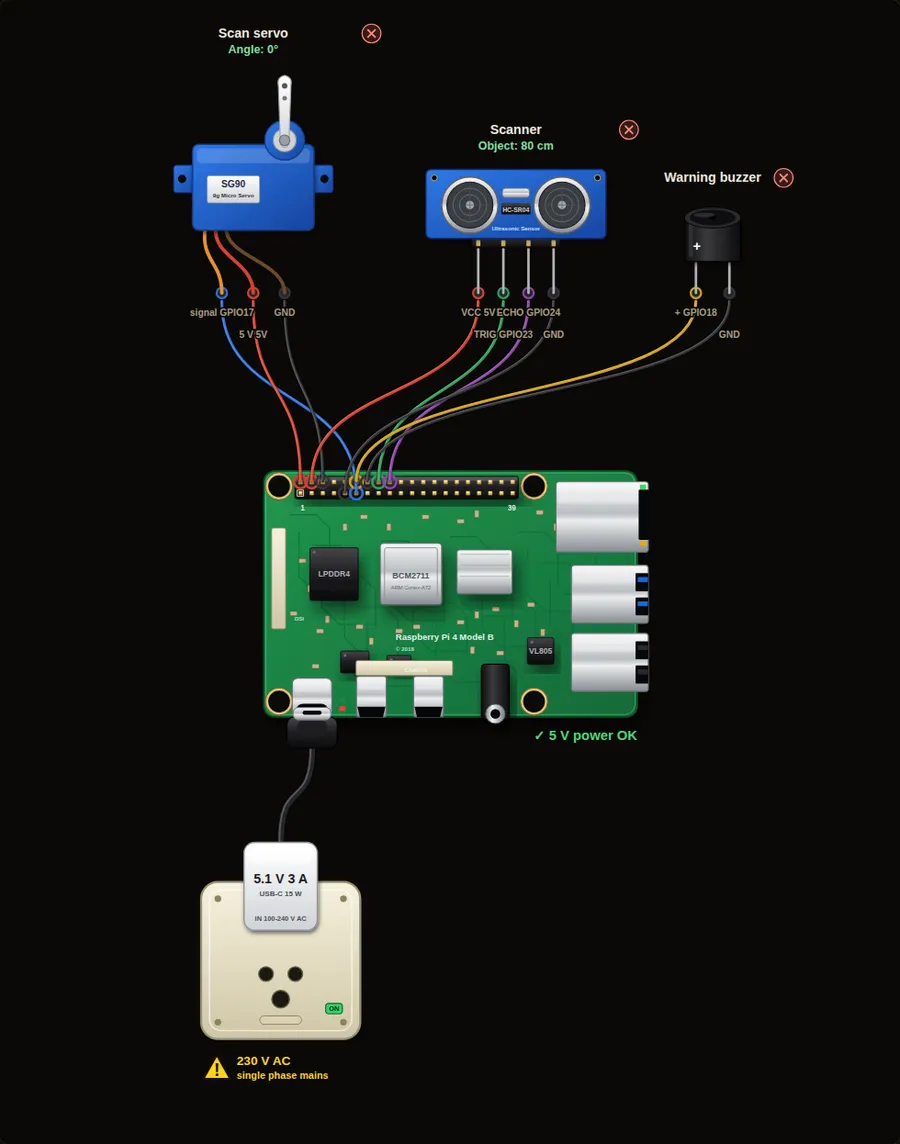
Parts in this circuit
| Part | Type |
|---|---|
| Scan servo | Servo |
| Scanner | Ultrasonic sensor |
| Warning buzzer | Buzzer |
Wiring, pin by pin
Red = 5 V, orange = 3.3 V, black = GND, other colours = signals. “Pin” is the position on the 40-pin header; the GPIO number is what the code uses. Power the Pi from a 5.1 V supply and wire with the power off.
| # | Colour | From (part and leg) | To (header pin) |
|---|---|---|---|
| 1 | Coloured | Scan servo - signal | Pin 11 (GPIO17) |
| 2 | Red | Scan servo - 5 V | Pin 2 (5V) |
| 3 | Black | Scan servo - GND | Pin 6 (GND) |
| 4 | Red | Scanner - VCC | Pin 4 (5V) |
| 5 | Coloured | Scanner - TRIG | Pin 16 (GPIO23) |
| 6 | Coloured | Scanner - ECHO | Pin 18 (GPIO24) |
| 7 | Black | Scanner - GND | Pin 9 (GND) |
| 8 | Coloured | Warning buzzer - + | Pin 12 (GPIO18) |
| 9 | Black | Warning buzzer - - | Pin 14 (GND) |
Python code (gpiozero)
from gpiozero import AngularServo, DistanceSensor, Buzzer
from time import sleep

servo = AngularServo(17, min_angle=-90, max_angle=90)
sensor = DistanceSensor(echo=24, trigger=23, max_distance=2)
buzzer = Buzzer(18)

def scan(angles):
    for angle in angles:
        servo.angle = angle
        sleep(0.4)                            # let the servo arrive
        cm = sensor.distance * 100
        print("%4d deg  %3d cm  %s" % (angle, cm, "#" * int(cm / 10)))
        if cm < 30:
            buzzer.beep(0.1, 0.1, n=2)

while True:
    scan(range(-90, 91, 30))                  # sweep left to right
    scan(range(90, -91, -30))                 # and back
How the code works
- scan(angles) is a function. You give it a list of angles and it visits each one.
- range(-90, 91, 30) counts from -90 to 90 in steps of 30.
- sleep(0.4) gives the servo time to arrive before the sensor measures.
- "#" * int(cm / 10) draws a bar, one # for every 10 cm.
You will learn
- Moving a sensor with a servo
- Making a table of readings
- Writing your own function with a list of angles
Try this
- Change the Object distance slider while the sweep runs and watch the bars.
- Use a step of 15 degrees for a finer scan.
- Print only the angle with the closest object after each sweep.
On a real Pi
- On a real robot each angle sees a different object. Here one distance value is used for all angles, so the bars change together.
- A cheap servo shakes the sensor. Wait until it stops before you measure.
- Keep the sensor wires loose enough to turn with the servo.
Parts to buy
The links open a search on each store, so you see what is in stock today. Check the model, voltage and price before you order.
| # | Item | Qty | Buy / compare |
|---|---|---|---|
| 1 | Raspberry Pi 4 Model B about 4000 to 9000 INR | 1 | Robu.in Amazon.in ThinkRobotics |
| 2 | Official 15 W USB-C power supply (5.1 V, 3 A) Do not use an old phone charger | 1 | Robu.in Amazon.in ThinkRobotics |
| 3 | microSD card 32 GB, class 10 / A1 (with Raspberry Pi OS) And a card reader to write it | 1 | Robu.in Amazon.in ThinkRobotics |
| 4 | Active buzzer, 5 V | 1 | Robu.in Amazon.in ThinkRobotics |
| 5 | HC-SR04 ultrasonic sensor | 1 | Robu.in Amazon.in ThinkRobotics |
| 6 | 1 k and 2 k resistors (ECHO voltage divider) | 2 | Robu.in Amazon.in ThinkRobotics |
| 7 | SG90 micro servo | 1 | Robu.in Amazon.in ThinkRobotics |
| 8 | Dupont jumper wires, male-to-female, 20 cm (pack of 40) | 1 | Robu.in Amazon.in ThinkRobotics |
| 9 | Breadboard 830 points For resistors and shared GND / 5 V | 1 | Robu.in Amazon.in ThinkRobotics |
This is a learning tool. The simulator checks the program logic, not the electrical design. Never put more than 3.3 V on a GPIO pin.