
Engineering · Raspberry Pi · Project 33 of 47 · Robotics · Intermediate
Obstacle-avoiding robot car
An ultrasonic sensor looks ahead. The car drives while the way is clear, slows down when something is near, and backs away when it is too close.
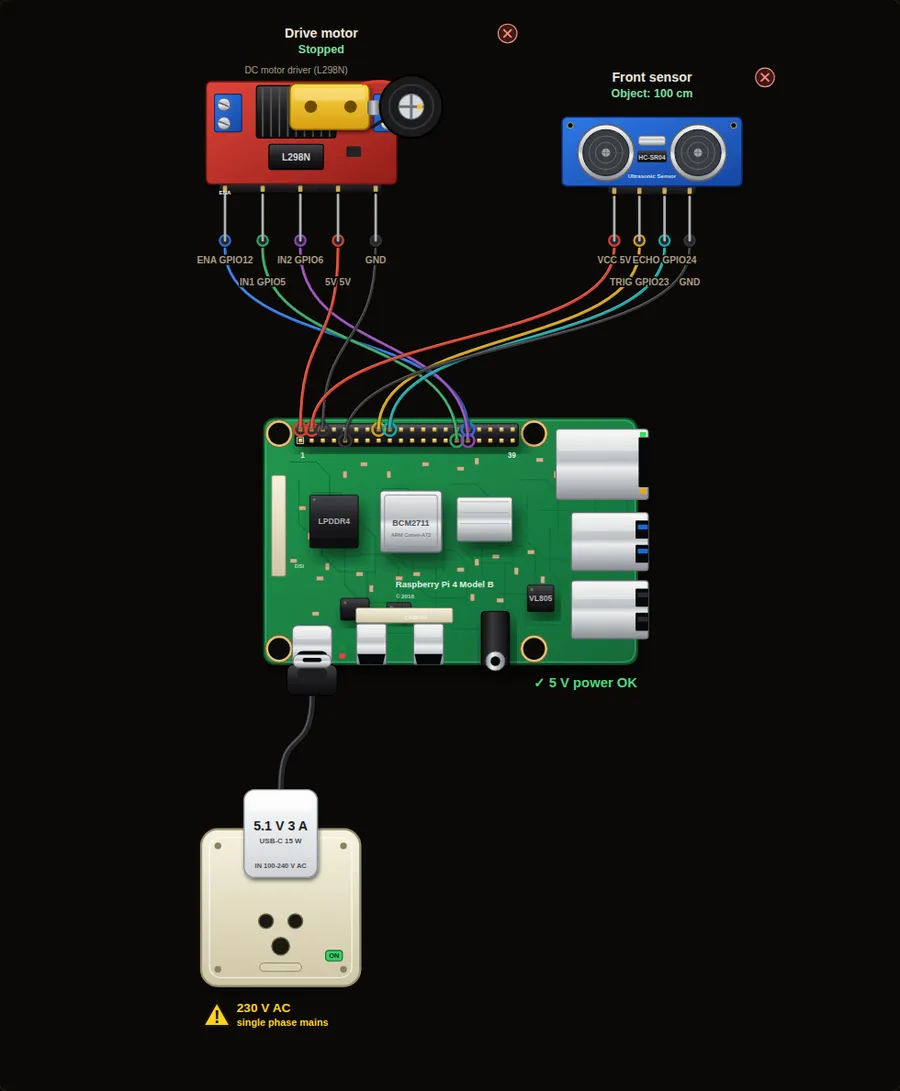
Parts in this circuit
| Part | Type |
|---|---|
| Drive motor | L298N motor driver |
| Front sensor | Ultrasonic sensor |
Wiring, pin by pin
Red = 5 V, orange = 3.3 V, black = GND, other colours = signals. “Pin” is the position on the 40-pin header; the GPIO number is what the code uses. Power the Pi from a 5.1 V supply and wire with the power off.
| # | Colour | From (part and leg) | To (header pin) |
|---|---|---|---|
| 1 | Coloured | Drive motor - ENA | Pin 32 (GPIO12) |
| 2 | Coloured | Drive motor - IN1 | Pin 29 (GPIO5) |
| 3 | Coloured | Drive motor - IN2 | Pin 31 (GPIO6) |
| 4 | Red | Drive motor - 5V | Pin 2 (5V) |
| 5 | Black | Drive motor - GND | Pin 6 (GND) |
| 6 | Red | Front sensor - VCC | Pin 4 (5V) |
| 7 | Coloured | Front sensor - TRIG | Pin 16 (GPIO23) |
| 8 | Coloured | Front sensor - ECHO | Pin 18 (GPIO24) |
| 9 | Black | Front sensor - GND | Pin 9 (GND) |
Python code (gpiozero)
from gpiozero import Motor, DistanceSensor
from time import sleep

motor = Motor(forward=5, backward=6, enable=12)
sensor = DistanceSensor(echo=24, trigger=23, max_distance=2)

while True:
    cm = sensor.distance * 100
    if cm > 40:
        motor.forward(0.9)                 # clear: full speed
        print("Clear,", round(cm), "cm: driving fast")
    elif cm > 15:
        motor.forward(0.4)                 # something ahead: slow down
        print("Object at", round(cm), "cm: slowing down")
    else:
        motor.stop()
        print("TOO CLOSE:", round(cm), "cm. Backing away")
        motor.backward(0.5)
        sleep(1)
        motor.stop()
    sleep(0.2)
How the code works
- sensor.distance gives metres. Multiplying by 100 gives centimetres.
- motor.forward(0.9) runs at 90 % speed. The enable pin carries the PWM signal.
- The if, elif and else give three zones, so the car slows down before it has to stop.
- The sleep(0.2) makes the car check five times a second.
You will learn
- Making decisions from a distance reading
- Controlling motor speed and direction
- Three zones: clear, slow, stop
Try this
- Slide the object distance from 200 cm down to 5 cm and watch the motor and the console.
- Change the slow-down distance to 60 cm.
- Make the car turn instead of backing: add a second motor and run only one of them.
On a real Pi
- The motor needs its own 6 to 12 V supply on the L298N. Join the grounds. Never power the motor from the Pi 5 V pin.
- The HC-SR04 ECHO pin gives 5 V: use a 1 k and 2 k divider before the Pi.
- Ultrasonic sensors miss soft cloth and thin chair legs. Add a second sensor or a bumper switch for safety.
Parts to buy
The links open a search on each store, so you see what is in stock today. Check the model, voltage and price before you order.
| # | Item | Qty | Buy / compare |
|---|---|---|---|
| 1 | Raspberry Pi 4 Model B about 4000 to 9000 INR | 1 | Robu.in Amazon.in ThinkRobotics |
| 2 | Official 15 W USB-C power supply (5.1 V, 3 A) Do not use an old phone charger | 1 | Robu.in Amazon.in ThinkRobotics |
| 3 | microSD card 32 GB, class 10 / A1 (with Raspberry Pi OS) And a card reader to write it | 1 | Robu.in Amazon.in ThinkRobotics |
| 4 | HC-SR04 ultrasonic sensor | 1 | Robu.in Amazon.in ThinkRobotics |
| 5 | 1 k and 2 k resistors (ECHO voltage divider) | 2 | Robu.in Amazon.in ThinkRobotics |
| 6 | L298N motor driver module | 1 | Robu.in Amazon.in ThinkRobotics |
| 7 | TT gear motor with wheel, 6 V | 1 | Robu.in Amazon.in ThinkRobotics |
| 8 | 4 x AA battery holder (6 V) or 9-12 V adapter Motor supply, separate from the Pi | 1 | Robu.in Amazon.in ThinkRobotics |
| 9 | Dupont jumper wires, male-to-female, 20 cm (pack of 40) | 1 | Robu.in Amazon.in ThinkRobotics |
| 10 | Breadboard 830 points For resistors and shared GND / 5 V | 1 | Robu.in Amazon.in ThinkRobotics |
This is a learning tool. The simulator checks the program logic, not the electrical design. Never put more than 3.3 V on a GPIO pin.