
Engineering · Raspberry Pi · Project 6 of 47 · Sensors · Beginner
Distance meter with an LED bar
An ultrasonic sensor measures distance. The closer your hand, the more LEDs light up, like a car parking sensor.
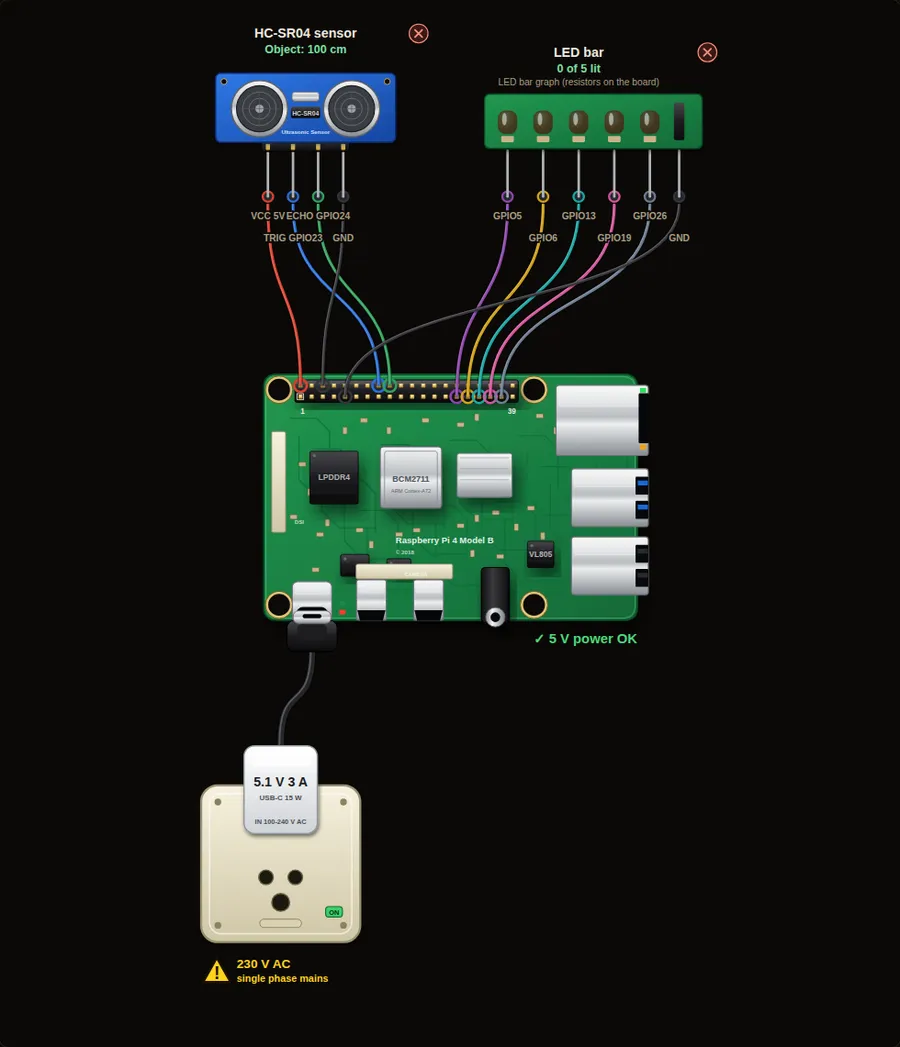
Parts in this circuit
| Part | Type |
|---|---|
| HC-SR04 sensor | Ultrasonic sensor |
| LED bar | LED bar |
Wiring, pin by pin
Red = 5 V, orange = 3.3 V, black = GND, other colours = signals. “Pin” is the position on the 40-pin header; the GPIO number is what the code uses. Power the Pi from a 5.1 V supply and wire with the power off.
| # | Colour | From (part and leg) | To (header pin) |
|---|---|---|---|
| 1 | Red | HC-SR04 sensor - VCC | Pin 2 (5V) |
| 2 | Coloured | HC-SR04 sensor - TRIG | Pin 16 (GPIO23) |
| 3 | Coloured | HC-SR04 sensor - ECHO | Pin 18 (GPIO24) |
| 4 | Black | HC-SR04 sensor - GND | Pin 6 (GND) |
| 5 | Coloured | LED bar - Signal | Pin 29 (GPIO5) |
| 6 | Coloured | LED bar - Signal | Pin 31 (GPIO6) |
| 7 | Coloured | LED bar - Signal | Pin 33 (GPIO13) |
| 8 | Coloured | LED bar - Signal | Pin 35 (GPIO19) |
| 9 | Coloured | LED bar - Signal | Pin 37 (GPIO26) |
| 10 | Black | LED bar - GND | Pin 9 (GND) |
Python code (gpiozero)
from gpiozero import DistanceSensor, LEDBarGraph
from time import sleep

sensor = DistanceSensor(echo=24, trigger=23, max_distance=2)
bar = LEDBarGraph(5, 6, 13, 19, 26)

while True:
    cm = sensor.distance * 100            # metres to centimetres
    bar.value = 1 - sensor.value          # closer object = more LEDs
    print("Distance:", round(cm), "cm")
    sleep(0.5)
How the code works
- The sensor sends a burst of sound from the trigger pin and times the echo. The Pi turns the time into a distance.
- sensor.distance is in metres, so multiply by 100 for centimetres.
- sensor.value runs from 0 (touching) to 1 (max distance). 1 minus that value gives more LEDs when closer.
You will learn
- Reading an analog-style value from a sensor
- Mapping a range to a bar graph
- Units: metres and centimetres
Try this
- Drag the slider and watch the LEDs.
- Print "STOP!" when the distance is under 10 cm.
- Make the buzzer beep faster as the object gets closer.
On a real Pi
- The HC-SR04 echo pin gives 5 V. Use a voltage divider (1 k and 2 k ohm) before the Pi pin, or a 3.3 V sensor.
- Soft or angled surfaces reflect sound badly. Expect readings to jump a little.
Parts to buy
The links open a search on each store, so you see what is in stock today. Check the model, voltage and price before you order.
| # | Item | Qty | Buy / compare |
|---|---|---|---|
| 1 | Raspberry Pi 4 Model B about 4000 to 9000 INR | 1 | Robu.in Amazon.in ThinkRobotics |
| 2 | Official 15 W USB-C power supply (5.1 V, 3 A) Do not use an old phone charger | 1 | Robu.in Amazon.in ThinkRobotics |
| 3 | microSD card 32 GB, class 10 / A1 (with Raspberry Pi OS) And a card reader to write it | 1 | Robu.in Amazon.in ThinkRobotics |
| 4 | 330 ohm resistor, 1/4 W One per LED | 5 | Robu.in Amazon.in ThinkRobotics |
| 5 | LED bar graph module (5 LEDs) | 1 | Robu.in Amazon.in ThinkRobotics |
| 6 | HC-SR04 ultrasonic sensor | 1 | Robu.in Amazon.in ThinkRobotics |
| 7 | 1 k and 2 k resistors (ECHO voltage divider) | 2 | Robu.in Amazon.in ThinkRobotics |
| 8 | Dupont jumper wires, male-to-female, 20 cm (pack of 40) | 1 | Robu.in Amazon.in ThinkRobotics |
| 9 | Breadboard 830 points For resistors and shared GND / 5 V | 1 | Robu.in Amazon.in ThinkRobotics |
This is a learning tool. The simulator checks the program logic, not the electrical design. Never put more than 3.3 V on a GPIO pin.