
Engineering · Raspberry Pi · Project 30 of 47 · Camera and vision · Intermediate
Security camera with PIR and alarm
A PIR sensor sees someone move. The Pi takes a photo of the intruder, sounds the buzzer and keeps the picture. The PIR saves power: the camera works only when needed.
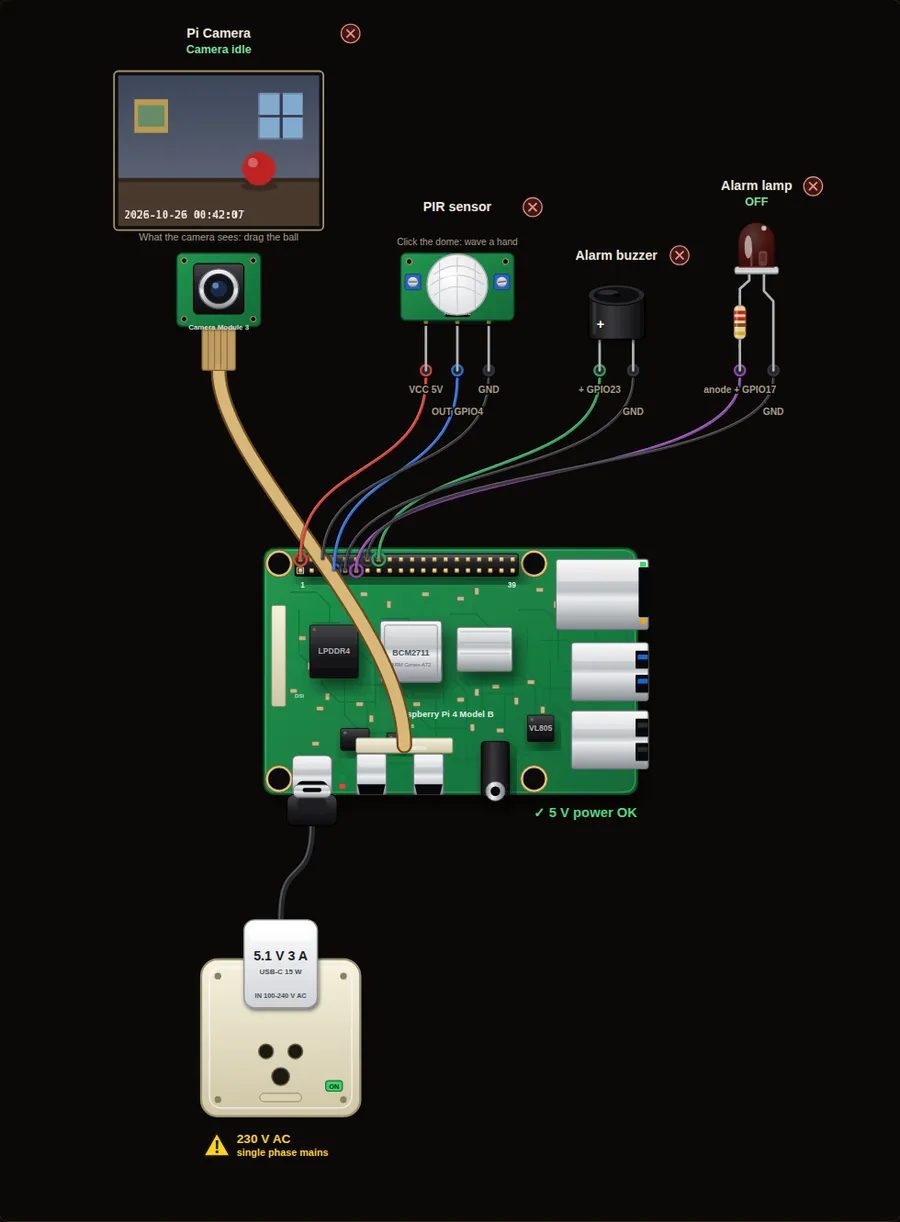
Privacy and safety. A camera records people. Tell everyone who lives in or visits the place, keep the pictures private, and delete old ones. Switch the Pi off before you plug in or remove the camera ribbon cable.
Parts in this circuit
| Part | Type |
|---|---|
| Pi Camera | Pi Camera Module 3 |
| PIR sensor | PIR sensor |
| Alarm buzzer | Buzzer |
| Alarm lamp | LED |
Wiring, pin by pin
Red = 5 V, orange = 3.3 V, black = GND, other colours = signals. “Pin” is the position on the 40-pin header; the GPIO number is what the code uses. Power the Pi from a 5.1 V supply and wire with the power off.
| # | Colour | From (part and leg) | To (header pin) |
|---|---|---|---|
| 1 | Red | PIR sensor - VCC | Pin 2 (5V) |
| 2 | Coloured | PIR sensor - OUT | Pin 7 (GPIO4) |
| 3 | Black | PIR sensor - GND | Pin 6 (GND) |
| 4 | Coloured | Alarm buzzer - + | Pin 16 (GPIO23) |
| 5 | Black | Alarm buzzer - - | Pin 9 (GND) |
| 6 | Coloured | Alarm lamp - anode + | Pin 11 (GPIO17) |
| 7 | Black | Alarm lamp - cathode - | Pin 14 (GND) |
Python code (gpiozero)
from picamera2 import Picamera2
from gpiozero import MotionSensor, Buzzer, LED
from signal import pause
from time import sleep

cam = Picamera2()
cam.configure(cam.create_still_configuration())
cam.start()
sleep(1)

pir = MotionSensor(4)
alarm = Buzzer(23)
lamp = LED(17)
shots = 0

def intruder():
    global shots
    shots += 1
    lamp.on()
    alarm.beep(on_time=0.2, off_time=0.2, n=3)
    cam.capture_file("intruder%d.jpg" % shots)
    print("Intruder! Photo", shots, "saved")

def quiet():
    lamp.off()

pir.when_motion = intruder
pir.when_no_motion = quiet
print("Armed. Click the PIR dome to wave a hand.")
pause()
How the code works
- The PIR is cheap and low power. It wakes up the rest of the system.
- intruder() runs when the PIR sees motion: lamp on, three beeps, one photo.
- The global counter makes each photo name different (intruder1.jpg, intruder2.jpg).
- The photo appears in the box under the console.
You will learn
- Combining two sensors: PIR first, camera second
- Events that run several actions
- Saving evidence with a new file name each time
Try this
- Move the ball to a new place, click the PIR dome and look at the photo.
- Take 3 photos, half a second apart, instead of one.
- Add a button that arms and disarms the alarm.
On a real Pi
- A home security camera records people. Tell the people who live and visit there, and keep the pictures private and safe.
- Store the photos on a USB drive or send them to your phone. A microSD card wears out if it is written all the time.
- A PIR needs about 30 seconds to settle after power-up. Do not arm the alarm in that time.
Parts to buy
The links open a search on each store, so you see what is in stock today. Check the model, voltage and price before you order.
| # | Item | Qty | Buy / compare |
|---|---|---|---|
| 1 | Raspberry Pi 4 Model B about 4000 to 9000 INR | 1 | Robu.in Amazon.in ThinkRobotics |
| 2 | Official 15 W USB-C power supply (5.1 V, 3 A) Do not use an old phone charger | 1 | Robu.in Amazon.in ThinkRobotics |
| 3 | microSD card 32 GB, class 10 / A1 (with Raspberry Pi OS) And a card reader to write it | 1 | Robu.in Amazon.in ThinkRobotics |
| 4 | 5 mm LED, red | 1 | Robu.in Amazon.in ThinkRobotics |
| 5 | 330 ohm resistor, 1/4 W One per LED | 1 | Robu.in Amazon.in ThinkRobotics |
| 6 | Active buzzer, 5 V | 1 | Robu.in Amazon.in ThinkRobotics |
| 7 | Raspberry Pi Camera Module 3 (12 MP, autofocus) Or a Camera Module 2 / HQ camera | 1 | Robu.in Amazon.in ThinkRobotics |
| 8 | CSI camera ribbon cable, 15-pin, 30 cm Check the port size of your board | 1 | Robu.in Amazon.in ThinkRobotics |
| 9 | Camera mount or small tripod | 1 | Robu.in Amazon.in ThinkRobotics |
| 10 | HC-SR501 PIR motion sensor | 1 | Robu.in Amazon.in ThinkRobotics |
| 11 | Dupont jumper wires, male-to-female, 20 cm (pack of 40) | 1 | Robu.in Amazon.in ThinkRobotics |
| 12 | Breadboard 830 points For resistors and shared GND / 5 V | 1 | Robu.in Amazon.in ThinkRobotics |
This is a learning tool. The simulator checks the program logic, not the electrical design. Never put more than 3.3 V on a GPIO pin.