
Engineering · Raspberry Pi · Project 19 of 47 · Industrial automation · Beginner
Production counter with batch alarm
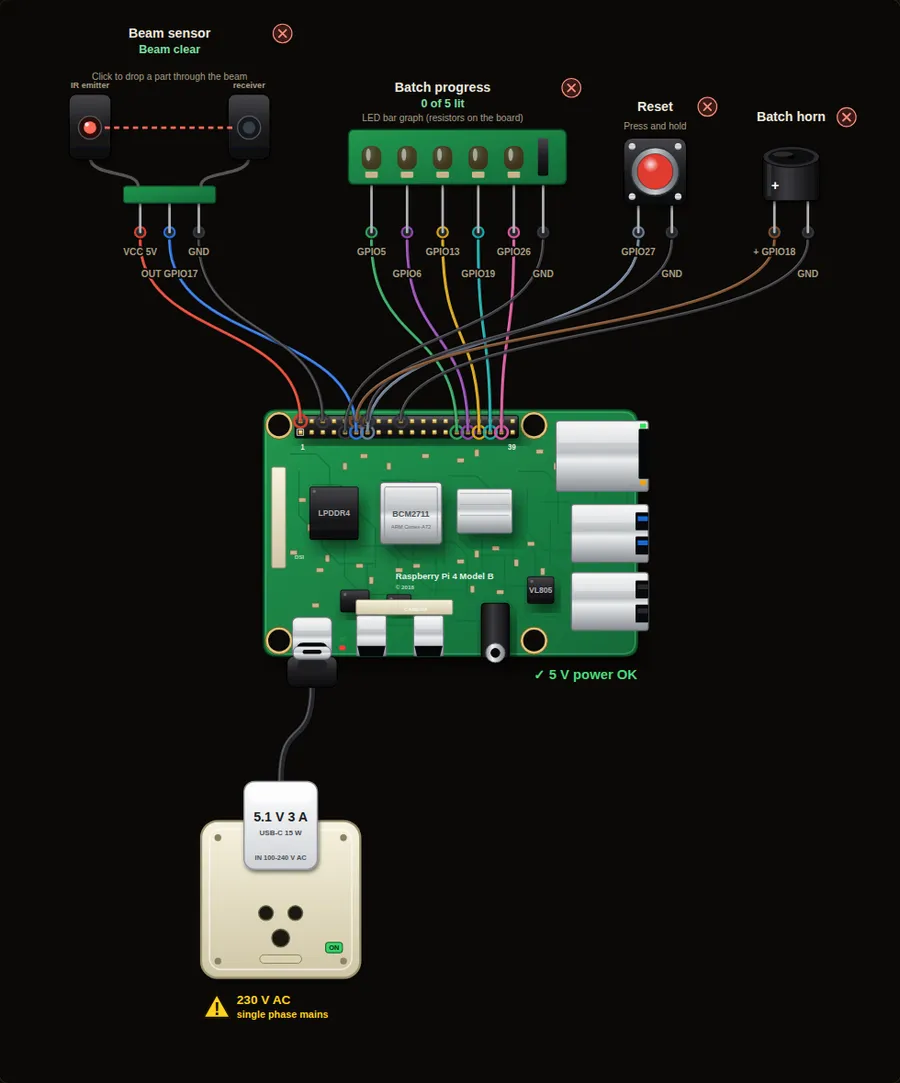
A beam-break sensor counts every part that passes on a conveyor. Five LEDs show progress to a batch of five, and a horn sounds when the batch is complete.
Machine safety. This project only shows signalling and logic. A real emergency stop must cut power through hard-wired safety-rated contacts and relays and must never depend on software or a Raspberry Pi.
Parts in this circuit
| Part | Type |
|---|---|
| Beam sensor | Beam sensor |
| Batch progress | LED bar |
| Reset | Push button |
| Batch horn | Buzzer |
Wiring, pin by pin
Red = 5 V, orange = 3.3 V, black = GND, other colours = signals. “Pin” is the position on the 40-pin header; the GPIO number is what the code uses. Power the Pi from a 5.1 V supply and wire with the power off.
| # | Colour | From (part and leg) | To (header pin) |
|---|---|---|---|
| 1 | Red | Beam sensor - VCC | Pin 2 (5V) |
| 2 | Coloured | Beam sensor - OUT | Pin 11 (GPIO17) |
| 3 | Black | Beam sensor - GND | Pin 6 (GND) |
| 4 | Coloured | Batch progress - Signal | Pin 29 (GPIO5) |
| 5 | Coloured | Batch progress - Signal | Pin 31 (GPIO6) |
| 6 | Coloured | Batch progress - Signal | Pin 33 (GPIO13) |
| 7 | Coloured | Batch progress - Signal | Pin 35 (GPIO19) |
| 8 | Coloured | Batch progress - Signal | Pin 37 (GPIO26) |
| 9 | Black | Batch progress - GND | Pin 9 (GND) |
| 10 | Coloured | Reset - Signal | Pin 13 (GPIO27) |
| 11 | Black | Reset - GND | Pin 14 (GND) |
| 12 | Coloured | Batch horn - + | Pin 12 (GPIO18) |
| 13 | Black | Batch horn - - | Pin 20 (GND) |
Python code (gpiozero)
from gpiozero import Button, LEDBarGraph, Buzzer
from signal import pause

beam = Button(17)                       # beam broken = "pressed"
reset = Button(27)
bar = LEDBarGraph(5, 6, 13, 19, 26)     # shows the progress in the batch
horn = Buzzer(18)

BATCH = 5
total = 0

def part_passed():
    global total
    total += 1
    in_batch = total % BATCH
    print("Part", total, "- batch progress:", in_batch or BATCH, "of", BATCH)
    if in_batch == 0:
        bar.value = 1                    # all five LEDs on
        horn.beep(0.15, 0.1, n=3)
        print("BATCH COMPLETE:", total // BATCH, "batch(es) done")
    else:
        bar.value = in_batch / BATCH

def reset_count():
    global total
    total = 0
    bar.value = 0
    print("Counter reset")

beam.when_pressed = part_passed
reset.when_pressed = reset_count
print("Click the beam sensor to drop a part")
pause()
How the code works
- An infrared emitter and receiver face each other. A part passing through breaks the beam, and the signal changes. gpiozero sees this as a button press.
- Every press calls part_passed(). It adds one to total and uses total % BATCH to know how far the batch has gone.
- When the remainder is 0 the batch is complete: the bar is full and the horn beeps 3 times.
- The Reset button brings the counter back to zero, like a counter reset on a real machine.
You will learn
- Counting events with a sensor and a global counter
- Modulo (%) to find the position inside a batch
- Why industry counts with sensors, not with timers
Try this
- Drop five parts and listen for the horn.
- Change BATCH to 3 and use only three LEDs.
- Add a second beam that counts rejected parts separately.
On a real Pi
- Use an industrial photoelectric sensor (NPN or PNP) and a level shifter or optocoupler. Never connect 24 V directly to a GPIO pin.
- Real conveyors move fast, so a part may break the beam for only a few milliseconds. Python on a Pi is fine for slow lines. For fast counting use a PLC or a hardware counter.
Parts to buy
The links open a search on each store, so you see what is in stock today. Check the model, voltage and price before you order.
| # | Item | Qty | Buy / compare |
|---|---|---|---|
| 1 | Raspberry Pi 4 Model B about 4000 to 9000 INR | 1 | Robu.in Amazon.in ThinkRobotics |
| 2 | Official 15 W USB-C power supply (5.1 V, 3 A) Do not use an old phone charger | 1 | Robu.in Amazon.in ThinkRobotics |
| 3 | microSD card 32 GB, class 10 / A1 (with Raspberry Pi OS) And a card reader to write it | 1 | Robu.in Amazon.in ThinkRobotics |
| 4 | 330 ohm resistor, 1/4 W One per LED | 5 | Robu.in Amazon.in ThinkRobotics |
| 5 | LED bar graph module (5 LEDs) | 1 | Robu.in Amazon.in ThinkRobotics |
| 6 | Tactile push button (12 mm, with cap) | 1 | Robu.in Amazon.in ThinkRobotics |
| 7 | Active buzzer, 5 V | 1 | Robu.in Amazon.in ThinkRobotics |
| 8 | IR beam / break-beam sensor pair (3.3 V compatible) | 1 | Robu.in Amazon.in ThinkRobotics |
| 9 | Dupont jumper wires, male-to-female, 20 cm (pack of 40) | 1 | Robu.in Amazon.in ThinkRobotics |
| 10 | Breadboard 830 points For resistors and shared GND / 5 V | 1 | Robu.in Amazon.in ThinkRobotics |
This is a learning tool. The simulator checks the program logic, not the electrical design. Never put more than 3.3 V on a GPIO pin.