
Engineering · Raspberry Pi · Project 9 of 47 · Motion · Beginner
DC motor with an H-bridge
Drive a small DC motor forward and backward through a motor driver board. The same wiring idea runs robot cars.
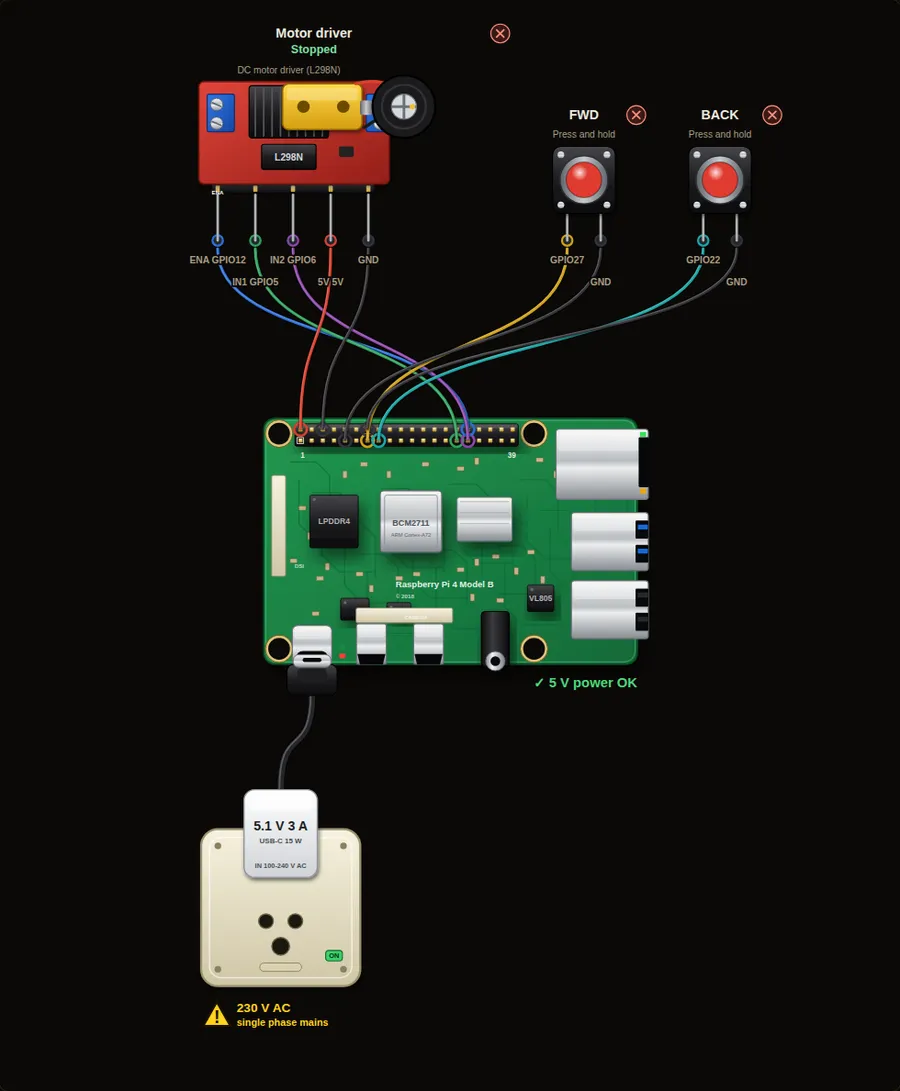
Parts in this circuit
| Part | Type |
|---|---|
| Motor driver | L298N motor driver |
| FWD | Push button |
| BACK | Push button |
Wiring, pin by pin
Red = 5 V, orange = 3.3 V, black = GND, other colours = signals. “Pin” is the position on the 40-pin header; the GPIO number is what the code uses. Power the Pi from a 5.1 V supply and wire with the power off.
| # | Colour | From (part and leg) | To (header pin) |
|---|---|---|---|
| 1 | Coloured | Motor driver - ENA | Pin 32 (GPIO12) |
| 2 | Coloured | Motor driver - IN1 | Pin 29 (GPIO5) |
| 3 | Coloured | Motor driver - IN2 | Pin 31 (GPIO6) |
| 4 | Red | Motor driver - 5V | Pin 2 (5V) |
| 5 | Black | Motor driver - GND | Pin 6 (GND) |
| 6 | Coloured | FWD - Signal | Pin 13 (GPIO27) |
| 7 | Black | FWD - GND | Pin 9 (GND) |
| 8 | Coloured | BACK - Signal | Pin 15 (GPIO22) |
| 9 | Black | BACK - GND | Pin 14 (GND) |
Python code (gpiozero)
from gpiozero import Motor, Button
from signal import pause

motor = Motor(forward=5, backward=6, enable=12)
fwd = Button(27)
back = Button(22)

fwd.when_pressed = motor.forward      # run forward while held
fwd.when_released = motor.stop
back.when_pressed = motor.backward
back.when_released = motor.stop

print("Hold FWD or BACK to drive the motor")
pause()
How the code works
- The driver board switches the heavy motor current. The Pi only sends small control signals to IN1 and IN2.
- Motor(forward=5, backward=6) sets IN1 high for forward and IN2 high for backward.
- motor.forward(0.5) would run at half speed using PWM.
You will learn
- Why a Pi pin cannot drive a motor directly
- H-bridge: two inputs choose the direction
- Speed with PWM
Try this
- Change motor.forward to a function that runs at half speed.
- Make the motor ramp up smoothly to full speed.
- Add a stop button that works even if another button is held.
On a real Pi
- Never connect a motor to a GPIO pin. Use a driver (L298N, L293D, TB6612) with its own supply.
- Put a flyback diode on bare relay or motor coils. Most driver boards already have them.
Parts to buy
The links open a search on each store, so you see what is in stock today. Check the model, voltage and price before you order.
| # | Item | Qty | Buy / compare |
|---|---|---|---|
| 1 | Raspberry Pi 4 Model B about 4000 to 9000 INR | 1 | Robu.in Amazon.in ThinkRobotics |
| 2 | Official 15 W USB-C power supply (5.1 V, 3 A) Do not use an old phone charger | 1 | Robu.in Amazon.in ThinkRobotics |
| 3 | microSD card 32 GB, class 10 / A1 (with Raspberry Pi OS) And a card reader to write it | 1 | Robu.in Amazon.in ThinkRobotics |
| 4 | Tactile push button (12 mm, with cap) | 2 | Robu.in Amazon.in ThinkRobotics |
| 5 | L298N motor driver module | 1 | Robu.in Amazon.in ThinkRobotics |
| 6 | TT gear motor with wheel, 6 V | 1 | Robu.in Amazon.in ThinkRobotics |
| 7 | 4 x AA battery holder (6 V) or 9-12 V adapter Motor supply, separate from the Pi | 1 | Robu.in Amazon.in ThinkRobotics |
| 8 | Dupont jumper wires, male-to-female, 20 cm (pack of 40) | 1 | Robu.in Amazon.in ThinkRobotics |
| 9 | Breadboard 830 points For resistors and shared GND / 5 V | 1 | Robu.in Amazon.in ThinkRobotics |
This is a learning tool. The simulator checks the program logic, not the electrical design. Never put more than 3.3 V on a GPIO pin.