
Engineering · Raspberry Pi · Project 21 of 47 · Industrial automation · Advanced
Conveyor sorter with a diverter gate
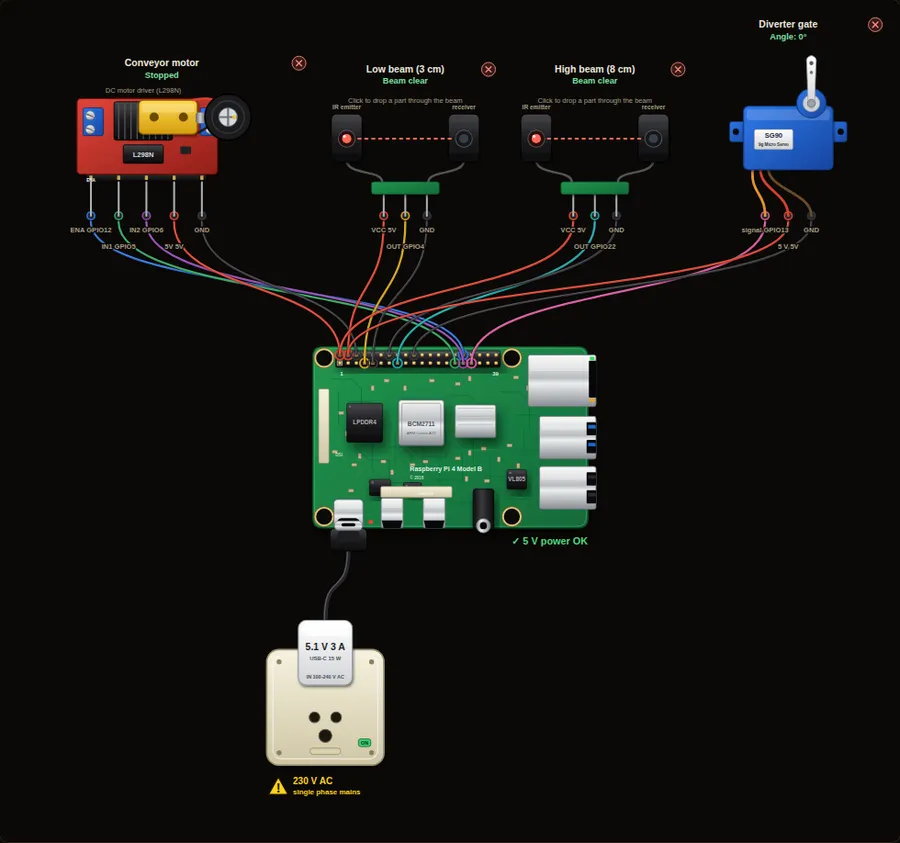
A belt carries parts past two beam sensors at different heights. A tall part breaks both beams, a short part breaks only the low one. A servo gate sends each part to the right bin.
Machine safety. This project only shows signalling and logic. A real emergency stop must cut power through hard-wired safety-rated contacts and relays and must never depend on software or a Raspberry Pi.
Parts in this circuit
| Part | Type |
|---|---|
| Conveyor motor | L298N motor driver |
| Low beam (3 cm) | Beam sensor |
| High beam (8 cm) | Beam sensor |
| Diverter gate | Servo |
Wiring, pin by pin
Red = 5 V, orange = 3.3 V, black = GND, other colours = signals. “Pin” is the position on the 40-pin header; the GPIO number is what the code uses. Power the Pi from a 5.1 V supply and wire with the power off.
| # | Colour | From (part and leg) | To (header pin) |
|---|---|---|---|
| 1 | Coloured | Conveyor motor - ENA | Pin 32 (GPIO12) |
| 2 | Coloured | Conveyor motor - IN1 | Pin 29 (GPIO5) |
| 3 | Coloured | Conveyor motor - IN2 | Pin 31 (GPIO6) |
| 4 | Red | Conveyor motor - 5V | Pin 2 (5V) |
| 5 | Black | Conveyor motor - GND | Pin 6 (GND) |
| 6 | Red | Low beam (3 cm) - VCC | Pin 4 (5V) |
| 7 | Coloured | Low beam (3 cm) - OUT | Pin 7 (GPIO4) |
| 8 | Black | Low beam (3 cm) - GND | Pin 9 (GND) |
| 9 | Red | High beam (8 cm) - VCC | Pin 2 (5V) |
| 10 | Coloured | High beam (8 cm) - OUT | Pin 15 (GPIO22) |
| 11 | Black | High beam (8 cm) - GND | Pin 14 (GND) |
| 12 | Coloured | Diverter gate - signal | Pin 33 (GPIO13) |
| 13 | Red | Diverter gate - 5 V | Pin 4 (5V) |
| 14 | Black | Diverter gate - GND | Pin 20 (GND) |
Python code (gpiozero)
from gpiozero import Motor, Button, AngularServo
from time import sleep

belt = Motor(5, 6, enable=12)
low = Button(4)               # beam 3 cm above the belt
high = Button(22)             # beam 8 cm above the belt
gate = AngularServo(13)       # -45 degrees = bin A, +45 degrees = bin B

short_count = 0
tall_count = 0

belt.forward(0.6)             # run the belt at 60 % speed
gate.angle = 0
print("Belt running. Use the buttons under the board to send parts.")

while True:
    low.wait_for_press()      # a part has arrived
    sleep(0.05)               # let both beams settle
    if high.is_pressed:
        tall_count += 1
        gate.angle = 45
        print("TALL part -> bin B   (tall:", tall_count, ")")
    else:
        short_count += 1
        gate.angle = -45
        print("SHORT part -> bin A  (short:", short_count, ")")
    low.wait_for_release()    # wait until the part has gone
How the code works
- The belt motor runs the whole time at 60 % speed. In a real machine you would stop it in an emergency, as in project 20.
- The low beam tells us a part has arrived. After a short wait we check the high beam. If it is also broken, the part is tall.
- The servo gate turns to the correct side before the part reaches it. A real machine needs a delay that matches the belt speed and the distance to the gate.
- wait_for_release() makes sure one part is counted only once, even though it takes time to pass.
You will learn
- Sorting with two sensors
- Sequencing: detect, decide, act, wait
- Driving a belt and a gate from one program
Try this
- Send a short part, then a tall part, and watch the gate move.
- Run the belt at full speed and move the gate at the right time with sleep().
- Stop the belt and light a lamp when 10 parts have been sorted.
On a real Pi
- Use a PLC for a real sorter. A Pi is good for learning the logic and for slow, low-risk lines.
- Place the gate close to the beams and use the belt speed (distance divided by speed) to time the gate.
- Add guards and an e-stop that cuts power to the motor with hard-wired contacts.
Parts to buy
The links open a search on each store, so you see what is in stock today. Check the model, voltage and price before you order.
| # | Item | Qty | Buy / compare |
|---|---|---|---|
| 1 | Raspberry Pi 4 Model B about 4000 to 9000 INR | 1 | Robu.in Amazon.in ThinkRobotics |
| 2 | Official 15 W USB-C power supply (5.1 V, 3 A) Do not use an old phone charger | 1 | Robu.in Amazon.in ThinkRobotics |
| 3 | microSD card 32 GB, class 10 / A1 (with Raspberry Pi OS) And a card reader to write it | 1 | Robu.in Amazon.in ThinkRobotics |
| 4 | SG90 micro servo | 1 | Robu.in Amazon.in ThinkRobotics |
| 5 | L298N motor driver module | 1 | Robu.in Amazon.in ThinkRobotics |
| 6 | TT gear motor with wheel, 6 V | 1 | Robu.in Amazon.in ThinkRobotics |
| 7 | 4 x AA battery holder (6 V) or 9-12 V adapter Motor supply, separate from the Pi | 1 | Robu.in Amazon.in ThinkRobotics |
| 8 | IR beam / break-beam sensor pair (3.3 V compatible) | 2 | Robu.in Amazon.in ThinkRobotics |
| 9 | Dupont jumper wires, male-to-female, 20 cm (pack of 40) | 1 | Robu.in Amazon.in ThinkRobotics |
| 10 | Breadboard 830 points For resistors and shared GND / 5 V | 1 | Robu.in Amazon.in ThinkRobotics |
← 20. Machine stack light with start, stop and e-stopAll projects22. Motor start/stop with a seal-in circuit →
This is a learning tool. The simulator checks the program logic, not the electrical design. Never put more than 3.3 V on a GPIO pin.