
Engineering · Raspberry Pi · Project 40 of 47 · Games and logic · Intermediate
Button code lock
Enter a four-key code on three buttons. The right code turns the servo bolt for five seconds. A wrong code flashes the red lamp and counts a failed try.
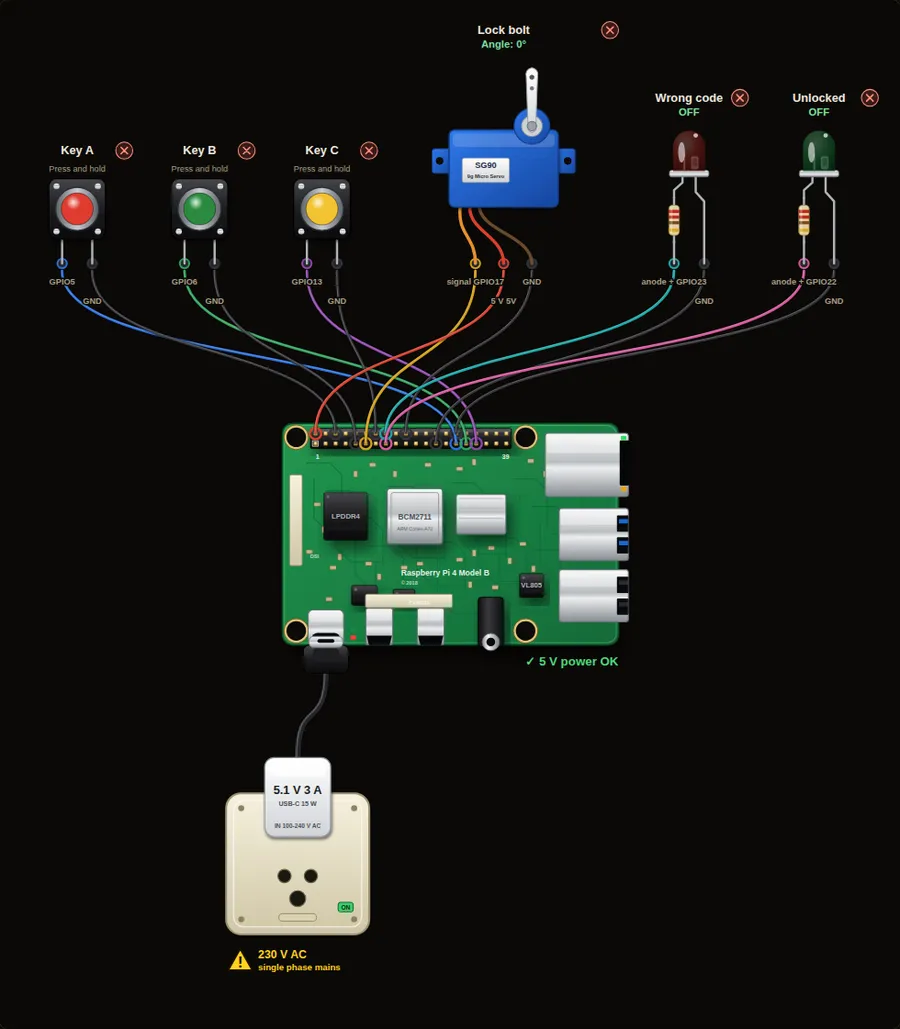
Parts in this circuit
| Part | Type |
|---|---|
| Key A | Push button |
| Key B | Push button |
| Key C | Push button |
| Lock bolt | Servo |
| Wrong code | LED |
| Unlocked | LED |
Wiring, pin by pin
Red = 5 V, orange = 3.3 V, black = GND, other colours = signals. “Pin” is the position on the 40-pin header; the GPIO number is what the code uses. Power the Pi from a 5.1 V supply and wire with the power off.
| # | Colour | From (part and leg) | To (header pin) |
|---|---|---|---|
| 1 | Coloured | Key A - Signal | Pin 29 (GPIO5) |
| 2 | Black | Key A - GND | Pin 6 (GND) |
| 3 | Coloured | Key B - Signal | Pin 31 (GPIO6) |
| 4 | Black | Key B - GND | Pin 9 (GND) |
| 5 | Coloured | Key C - Signal | Pin 33 (GPIO13) |
| 6 | Black | Key C - GND | Pin 14 (GND) |
| 7 | Coloured | Lock bolt - signal | Pin 11 (GPIO17) |
| 8 | Red | Lock bolt - 5 V | Pin 2 (5V) |
| 9 | Black | Lock bolt - GND | Pin 20 (GND) |
| 10 | Coloured | Wrong code - anode + | Pin 16 (GPIO23) |
| 11 | Black | Wrong code - cathode - | Pin 25 (GND) |
| 12 | Coloured | Unlocked - anode + | Pin 15 (GPIO22) |
| 13 | Black | Unlocked - cathode - | Pin 30 (GND) |
Python code (gpiozero)
from gpiozero import AngularServo, Button, LED
from time import sleep

CODE = ["A", "B", "B", "C"]                    # the secret code
keys = {"A": Button(5), "B": Button(6), "C": Button(13)}
bolt = AngularServo(17, min_angle=-90, max_angle=90)   # 0 = locked, 90 = open
red = LED(23)
green = LED(22)

def wait_key():
    while True:
        for name, button in keys.items():
            if button.is_pressed:
                while button.is_pressed:
                    sleep(0.02)
                return name
        sleep(0.02)

bolt.angle = 0
fails = 0
while True:
    entered = []
    while len(entered) < len(CODE):
        entered.append(wait_key())
        print("Keys so far:", len(entered))
    if entered == CODE:
        print("Correct code: UNLOCKED")
        fails = 0
        bolt.angle = 90
        green.on()
        sleep(5)
        bolt.angle = 0
        green.off()
        print("Locked again")
    else:
        fails += 1
        print("Wrong code. Failed tries:", fails)
        for _ in range(3):
            red.on()
            sleep(0.2)
            red.off()
            sleep(0.2)
        if fails >= 3:
            print("Too many tries: locked for 10 seconds")
            sleep(10)
            fails = 0
How the code works
- A dictionary keeps the three buttons by letter. wait_key() gives back the letter of the button that was pressed and released.
- The inner while loop collects four keys, then entered == CODE compares the two lists.
- After three wrong codes the lock stops answering for 10 seconds.
You will learn
- Comparing lists
- Building a list one key at a time
- Limiting the number of tries
Try this
- Hold the A, B, B and C key buttons in order.
- Change the secret code.
- Make the lock beep once for each key press.
On a real Pi
- A code on three buttons is a toy. A real lock needs a keypad, strong code and tamper protection.
- Do not keep the secret code in plain text on a device that others can read.
- A real lock needs power-cut safety: use a manual key or battery backup.
Parts to buy
The links open a search on each store, so you see what is in stock today. Check the model, voltage and price before you order.
| # | Item | Qty | Buy / compare |
|---|---|---|---|
| 1 | Raspberry Pi 4 Model B about 4000 to 9000 INR | 1 | Robu.in Amazon.in ThinkRobotics |
| 2 | Official 15 W USB-C power supply (5.1 V, 3 A) Do not use an old phone charger | 1 | Robu.in Amazon.in ThinkRobotics |
| 3 | microSD card 32 GB, class 10 / A1 (with Raspberry Pi OS) And a card reader to write it | 1 | Robu.in Amazon.in ThinkRobotics |
| 4 | 5 mm LED, red | 1 | Robu.in Amazon.in ThinkRobotics |
| 5 | 5 mm LED, green | 1 | Robu.in Amazon.in ThinkRobotics |
| 6 | 330 ohm resistor, 1/4 W One per LED | 2 | Robu.in Amazon.in ThinkRobotics |
| 7 | Tactile push button (12 mm, with cap) | 3 | Robu.in Amazon.in ThinkRobotics |
| 8 | SG90 micro servo | 1 | Robu.in Amazon.in ThinkRobotics |
| 9 | Dupont jumper wires, male-to-female, 20 cm (pack of 40) | 1 | Robu.in Amazon.in ThinkRobotics |
| 10 | Breadboard 830 points For resistors and shared GND / 5 V | 1 | Robu.in Amazon.in ThinkRobotics |
This is a learning tool. The simulator checks the program logic, not the electrical design. Never put more than 3.3 V on a GPIO pin.