
Engineering · Raspberry Pi · Project 23 of 47 · Industrial automation · Advanced
Sequenced conveyor start and stop
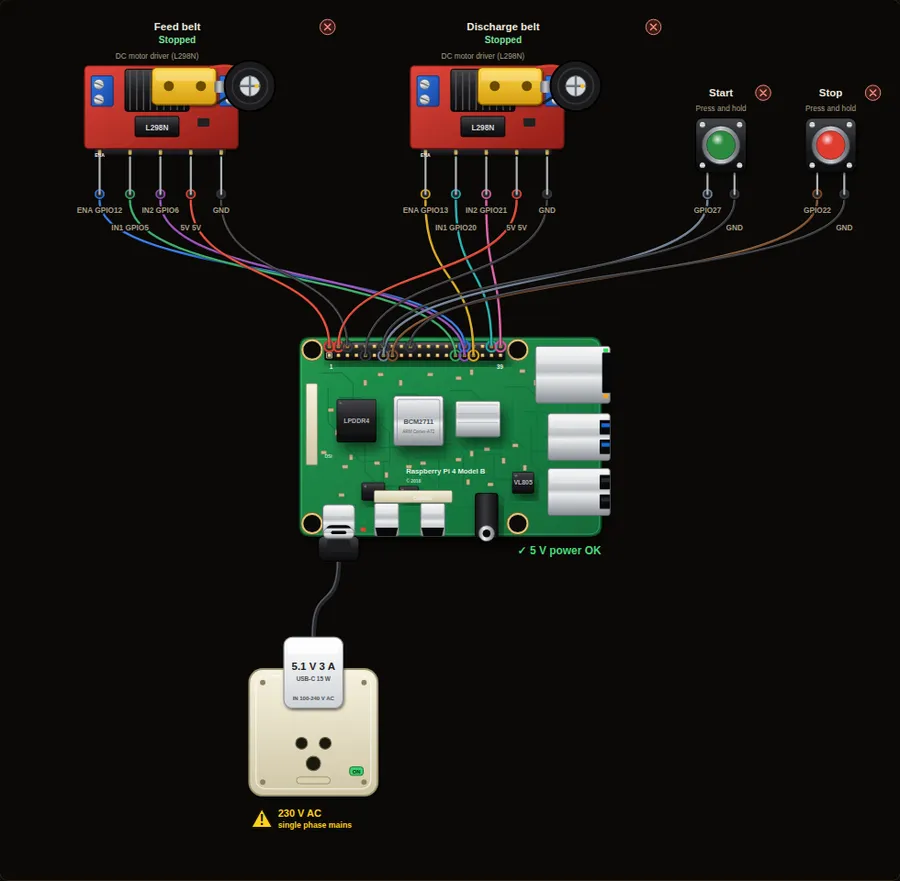
Two belts must start and stop in the right order, or parts pile up. Start runs the discharge belt first, then the feed belt after a delay. Stop reverses the order.
Machine safety. This project only shows signalling and logic. A real emergency stop must cut power through hard-wired safety-rated contacts and relays and must never depend on software or a Raspberry Pi.
Parts in this circuit
| Part | Type |
|---|---|
| Feed belt | L298N motor driver |
| Discharge belt | L298N motor driver |
| Start | Push button |
| Stop | Push button |
Wiring, pin by pin
Red = 5 V, orange = 3.3 V, black = GND, other colours = signals. “Pin” is the position on the 40-pin header; the GPIO number is what the code uses. Power the Pi from a 5.1 V supply and wire with the power off.
| # | Colour | From (part and leg) | To (header pin) |
|---|---|---|---|
| 1 | Coloured | Feed belt - ENA | Pin 32 (GPIO12) |
| 2 | Coloured | Feed belt - IN1 | Pin 29 (GPIO5) |
| 3 | Coloured | Feed belt - IN2 | Pin 31 (GPIO6) |
| 4 | Red | Feed belt - 5V | Pin 2 (5V) |
| 5 | Black | Feed belt - GND | Pin 6 (GND) |
| 6 | Coloured | Discharge belt - ENA | Pin 33 (GPIO13) |
| 7 | Coloured | Discharge belt - IN1 | Pin 38 (GPIO20) |
| 8 | Coloured | Discharge belt - IN2 | Pin 40 (GPIO21) |
| 9 | Red | Discharge belt - 5V | Pin 4 (5V) |
| 10 | Black | Discharge belt - GND | Pin 9 (GND) |
| 11 | Coloured | Start - Signal | Pin 13 (GPIO27) |
| 12 | Black | Start - GND | Pin 14 (GND) |
| 13 | Coloured | Stop - Signal | Pin 15 (GPIO22) |
| 14 | Black | Stop - GND | Pin 20 (GND) |
Python code (gpiozero)
from gpiozero import Motor, Button
from time import sleep

feed = Motor(5, 6, enable=12)         # belt 1 brings parts in
discharge = Motor(20, 21, enable=13)  # belt 2 takes them away
start = Button(27)
stop = Button(22)

DELAY = 3                             # seconds between belts

print("Press Start")
while True:
    start.wait_for_press()
    print("1. Discharge belt starts")
    discharge.forward(0.7)
    sleep(DELAY)
    print("2. Feed belt starts")
    feed.forward(0.7)
    print("Both belts running. Press Stop.")

    stop.wait_for_press()
    print("3. Feed belt stops first")
    feed.stop()
    sleep(DELAY)
    print("4. Discharge belt stops (it clears the last parts)")
    discharge.stop()
    print("Press Start to run again")
How the code works
- If the feed belt started first, parts would drop onto a belt that is not moving and pile up. So the belt that moves parts away starts first.
- On stop, the feed belt stops first and the discharge belt runs 3 more seconds to clear every part.
- wait_for_press() holds the program at that line until the button is pressed. The 3 second delays are the timers of a PLC program.
- Each belt has its own H-bridge: EN sets the speed, IN1 and IN2 set the direction.
You will learn
- Sequential control with delays
- Why start and stop order matters in a conveyor line
- Two motors from one program
Try this
- Run the sequence once and watch both belts in the console and on the board.
- Press Stop during the start delay. Does the program notice? Fix it so it does.
- Add an e-stop that stops both belts at once and a stack light from project 20.
On a real Pi
- A real conveyor uses a motor starter or a variable frequency drive. A Pi pin can only drive the control side through a relay or an interlock.
- Add run feedback (a contact or a speed sensor) so the program knows the belt really turned, and stop the sequence if it did not.
Parts to buy
The links open a search on each store, so you see what is in stock today. Check the model, voltage and price before you order.
| # | Item | Qty | Buy / compare |
|---|---|---|---|
| 1 | Raspberry Pi 4 Model B about 4000 to 9000 INR | 1 | Robu.in Amazon.in ThinkRobotics |
| 2 | Official 15 W USB-C power supply (5.1 V, 3 A) Do not use an old phone charger | 1 | Robu.in Amazon.in ThinkRobotics |
| 3 | microSD card 32 GB, class 10 / A1 (with Raspberry Pi OS) And a card reader to write it | 1 | Robu.in Amazon.in ThinkRobotics |
| 4 | Tactile push button (12 mm, with cap) | 2 | Robu.in Amazon.in ThinkRobotics |
| 5 | L298N motor driver module | 2 | Robu.in Amazon.in ThinkRobotics |
| 6 | TT gear motor with wheel, 6 V | 2 | Robu.in Amazon.in ThinkRobotics |
| 7 | 4 x AA battery holder (6 V) or 9-12 V adapter Motor supply, separate from the Pi | 2 | Robu.in Amazon.in ThinkRobotics |
| 8 | Dupont jumper wires, male-to-female, 20 cm (pack of 40) | 1 | Robu.in Amazon.in ThinkRobotics |
| 9 | Breadboard 830 points For resistors and shared GND / 5 V | 1 | Robu.in Amazon.in ThinkRobotics |
← 22. Motor start/stop with a seal-in circuitAll projects24. Tank level control with two float switches →
This is a learning tool. The simulator checks the program logic, not the electrical design. Never put more than 3.3 V on a GPIO pin.