
Engineering · PLC · Project 14 of 15 · Sequences · Level 3
Two-hand press control
A press only moves when both buttons are pressed together. Keeps hands out of the danger zone.
You will learn
Two-hand control forces the operator to use both hands. Both buttons must close within 0.5 s of each other and must be released before the next cycle. Real machines use a certified safety relay or safety PLC for this, not an ordinary one. This simulation only teaches the logic.
How it works
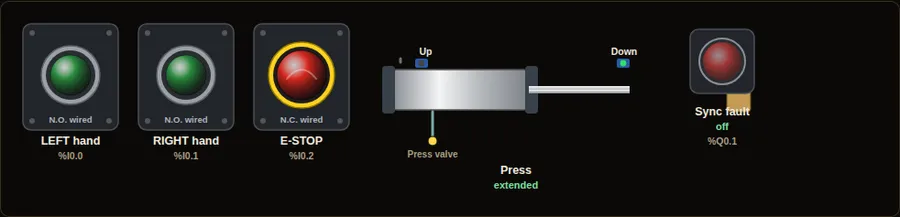
- Hold Shift and click both buttons to keep them down. Or use two fingers on a touch screen.
- The press descends only while both are held.
- Press one, wait over 0.5 s, then the other: the sync fault lights and the press will not move.
In real life
Punch presses, guillotines and moulding machines. This lesson is for learning only; any real machine needs certified safety hardware.
Inputs, outputs and addresses
The same signals on seven PLC brands. Inputs and outputs are numbered in order; check your own hardware and software, because addresses depend on the model and module position.
| Name | What it is | Type | Siemens S7-1200 | Allen-Bradley CompactLogix | Mitsubishi iQ-F FX5U | Delta DVP / AS | Omron CP2E | Schneider M241 | Inovance H5U |
|---|---|---|---|---|---|---|---|---|---|
| LH | Left-hand button | Input | %I0.0 | Local:1:I.Data.0 | X0 | X0 | 0.00 | %IX0.0 | X0 |
| RH | Right-hand button | Input | %I0.1 | Local:1:I.Data.1 | X1 | X1 | 0.01 | %IX0.1 | X1 |
| ESTOP | Emergency stop (N.C.) | Input | %I0.2 | Local:1:I.Data.2 | X2 | X2 | 0.02 | %IX0.2 | X2 |
| TOPS | Press up sensor | Input | %I0.3 | Local:1:I.Data.3 | X3 | X3 | 0.03 | %IX0.3 | X3 |
| BOTS | Press down sensor | Input | %I0.4 | Local:1:I.Data.4 | X4 | X4 | 0.04 | %IX0.4 | X4 |
| PRESS | Press valve | Output | %Q0.0 | Local:2:O.Data.0 | Y0 | Y0 | 100.00 | %QX0.0 | Y0 |
| SYNC | Sync fault lamp | Output | %Q0.1 | Local:2:O.Data.1 | Y1 | Y1 | 100.01 | %QX0.1 | Y1 |
Ladder diagram (shown for Siemens, live state)
Green wires carry power in the moment captured below. Switch the brand and the language in the simulator.
Structured text, Siemens SCL
(* Siemens S7-1200, CPU 1214C DC/DC/DC - TIA Portal - SCL *)
(* Rung 1: Left alone for 0.5 s *)
"T1"(IN := "LH" AND NOT "RH", PT := T#500ms);
(* Rung 2: Right alone for 0.5 s *)
"T2"(IN := "RH" AND NOT "LH", PT := T#500ms);
(* Rung 3: Latch sync fault if not pressed together *)
IF "T1".Q OR "T2".Q THEN "SYNC" := TRUE; END_IF;
(* Rung 4: Clear fault when both buttons are released *)
IF NOT "LH" AND NOT "RH" THEN "SYNC" := FALSE; END_IF;
(* Rung 5: Press moves only with both buttons *)
"PRESS" := "LH" AND "RH" AND NOT "SYNC" AND "ESTOP";
Structured text, Allen-Bradley
(* Allen-Bradley CompactLogix 5069 (L306ER) - Studio 5000 Logix Designer - Structured Text *)
(* Rung 1: Left alone for 0.5 s *)
Timer1.PRE := 500;   (* ms *)
Timer1.TimerEnable := LH AND NOT RH;
TONR(Timer1);
(* Rung 2: Right alone for 0.5 s *)
Timer2.PRE := 500;   (* ms *)
Timer2.TimerEnable := RH AND NOT LH;
TONR(Timer2);
(* Rung 3: Latch sync fault if not pressed together *)
IF Timer1.DN OR Timer2.DN THEN SYNC := TRUE; END_IF;
(* Rung 4: Clear fault when both buttons are released *)
IF NOT LH AND NOT RH THEN SYNC := FALSE; END_IF;
(* Rung 5: Press moves only with both buttons *)
PRESS := LH AND RH AND NOT SYNC AND ESTOP;
Try this
- Release one button during the stroke and the press retracts.
- Press E-STOP to cut the output.
Parts to buy
The links open a search on each store, so you see what is in stock today. Check the model, voltage and price before you order.
This is a learning tool. It teaches the logic, not the exact keystrokes of each vendor’s software. Check the manual of your own PLC.