
Engineering · PLC · Project 3 of 15 · Motor control · Level 3
Star-delta starter
Start a big motor gently in star, then switch to delta after a few seconds. Learn timers and three contactors.
You will learn
In star the motor sees about 58 % of the line voltage, so the starting current is roughly one third. After the timer the program drops star and pulls in delta. Star and delta must never be on together: each rung checks the other with an NC contact.
How it works
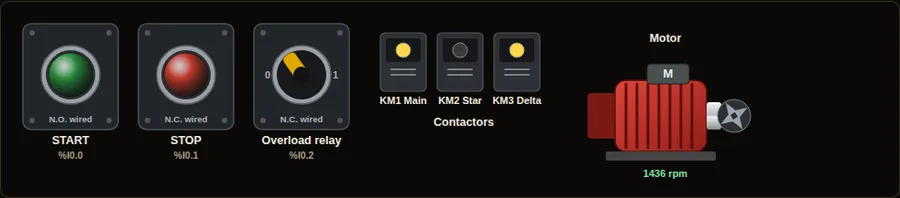
- Press START. Main and star close. The motor spins slowly at about 58 % speed in the animation.
- After 4 s the star contactor opens and the delta contactor closes. The motor reaches full speed.
- Press STOP. All three drop out and the timer resets.
In real life
Used on pumps, compressors and fans above about 5.5 kW where the supply cannot take the full starting current. Soft starters and drives now do this job too.
Inputs, outputs and addresses
The same signals on seven PLC brands. Inputs and outputs are numbered in order; check your own hardware and software, because addresses depend on the model and module position.
| Name | What it is | Type | Siemens S7-1200 | Allen-Bradley CompactLogix | Mitsubishi iQ-F FX5U | Delta DVP / AS | Omron CP2E | Schneider M241 | Inovance H5U |
|---|---|---|---|---|---|---|---|---|---|
| START | START push-button | Input | %I0.0 | Local:1:I.Data.0 | X0 | X0 | 0.00 | %IX0.0 | X0 |
| STOP | STOP push-button (N.C.) | Input | %I0.1 | Local:1:I.Data.1 | X1 | X1 | 0.01 | %IX0.1 | X1 |
| OL | Overload contact (N.C.) | Input | %I0.2 | Local:1:I.Data.2 | X2 | X2 | 0.02 | %IX0.2 | X2 |
| KM_MAIN | Main contactor | Output | %Q0.0 | Local:2:O.Data.0 | Y0 | Y0 | 100.00 | %QX0.0 | Y0 |
| KM_STAR | Star contactor | Output | %Q0.1 | Local:2:O.Data.1 | Y1 | Y1 | 100.01 | %QX0.1 | Y1 |
| KM_DELTA | Delta contactor | Output | %Q0.2 | Local:2:O.Data.2 | Y2 | Y2 | 100.02 | %QX0.2 | Y2 |
Ladder diagram (shown for Siemens, live state)
Green wires carry power in the moment captured below. Switch the brand and the language in the simulator.
Structured text, Siemens SCL
(* Siemens S7-1200, CPU 1214C DC/DC/DC - TIA Portal - SCL *)
(* Rung 1: Main contactor with seal-in *)
"KM_MAIN" := ("START" OR "KM_MAIN") AND "STOP" AND "OL";
(* Rung 2: Star time (4 s) *)
"T1"(IN := "KM_MAIN", PT := T#4s);
(* Rung 3: Star while the timer runs *)
"KM_STAR" := "KM_MAIN" AND NOT "T1".Q AND NOT "KM_DELTA";
(* Rung 4: Delta after the timer, star must be off *)
"KM_DELTA" := "KM_MAIN" AND "T1".Q AND NOT "KM_STAR";
Structured text, Allen-Bradley
(* Allen-Bradley CompactLogix 5069 (L306ER) - Studio 5000 Logix Designer - Structured Text *)
(* Rung 1: Main contactor with seal-in *)
KM_MAIN := (START OR KM_MAIN) AND STOP AND OL;
(* Rung 2: Star time (4 s) *)
Timer1.PRE := 4000;   (* ms *)
Timer1.TimerEnable := KM_MAIN;
TONR(Timer1);
(* Rung 3: Star while the timer runs *)
KM_STAR := KM_MAIN AND NOT Timer1.DN AND NOT KM_DELTA;
(* Rung 4: Delta after the timer, star must be off *)
KM_DELTA := KM_MAIN AND Timer1.DN AND NOT KM_STAR;
Try this
- Watch the timer value count up inside the TON block.
- Change the preset in your own program: try 2 s and 8 s.
Parts to buy
The links open a search on each store, so you see what is in stock today. Check the model, voltage and price before you order.
This is a learning tool. It teaches the logic, not the exact keystrokes of each vendor’s software. Check the manual of your own PLC.